
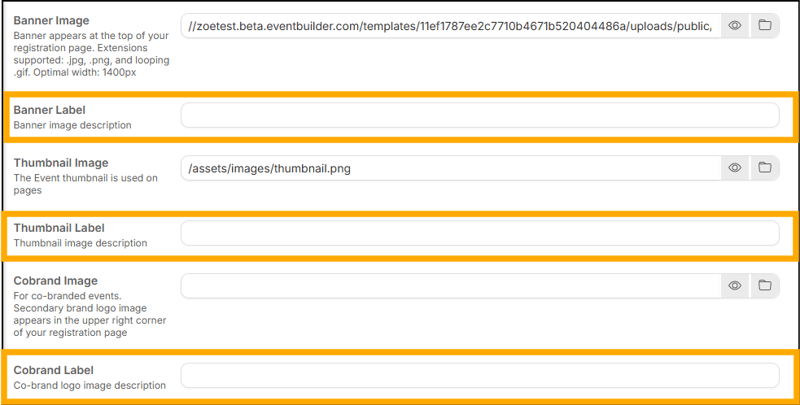
EventBuilder’s software offers Alt Text functionality in all image areas, including Banners, Thumbnail and Co-Brand Images. This feature is referred to as ‘Label.’
Example of Image Labels in software:
What Is Alt Text?
Alt text is a brief textual description of an image on a webpage. It serves as an essential accessibility feature, particularly for users who rely on screen readers or other assistive technologies. Instead of seeing the image, they hear the alt text, which helps them understand the image’s purpose and context.
Be Descriptive but Concise:
Keep it short—usually 1 to 2 sentences. Don’t overthink it. Focus on essential information without unnecessary detail.
Example: Poor Alt Text: “Group of people enjoying a picnic in the park.” / Better Alt Text: “Friends laughing and sharing food at a sunny park picnic.”
Contextual Relevance:
Ensure the alt text relates to the surrounding content. It should provide context for the image.
Example: If the image is part of an article about hiking trails, the alt text could mention the scenic mountain view or the trail markers.
No Need for “Image of” or “Picture of”:
Skip the redundant phrases. Screen readers already announce that it’s an image.
Example: Instead of “Image of a cat playing with a ball,” simply say “Cat playing with a ball.”
Specify Image Type (When Relevant):
If the image is a logo, illustration, painting, or cartoon, mention it.
Example: “Company logo: Acme Adventures.”
Avoid Duplicating Adjacent Text:
If the surrounding text already describes the image, don’t repeat it in the alt text.
Example: If the caption says, “Mount Everest Summit,” the alt text can be more concise.
End with a Period:
Proper punctuation matters. End your alt text sentence with a period/full stop.
Remember, alt text isn’t just a technical requirement; it’s an opportunity to create a more inclusive experience for everyone. So, next time you’re adding alt text, think of it as a friendly handshake to your users—welcoming them into your digital space.