

What's New
Version 3.38.0 & 3.39.0
August 2026
Top Release
Updates include standardised handling of first name, last name, and email address changes across both registrant and registration records, ensuring data remains accurate and aligned throughout the platform. We've also enhanced account credential storage to better support email address updates, making account management more flexible while maintaining security.
Additional Highlights:
-
Enhanced Social Media Image Display
We've implemented improvements to how images are displayed within social media posts, helping content appear more consistently and professionally across supported platforms. - More Flexible On-the-Fly Email Targeting
A new Registrant Created filter is now available when sending on-the-fly emails, making it easier to target audiences based on when registrants were added to your event. - Expanded Tenant Export Data
Tenant exports now include active integration information, giving administrators greater visibility into connected systems and platform configuration.
Under the Hood: Fixes and Enhancements
-
Fixed an issue where registration sorting could behave unexpectedly after a registrant's name was changed.
-
Removed EventBuilder variables from Registration Form and Survey introduction/conclusion editors where variable usage was not applicable.
-
Standardised processing for updates to registrant first name, last name, and email information across the platform.
-
Ongoing platform maintenance and performance improvements to support reliability, security, and scalability.

Version 3.37.0
June 2026
Top Release
Additional Highlights:
-
Improved Activity Tracking
New history tables have been added behind the scenes to support more robust tracking of activity metrics. These improvements lay the groundwork for deeper reporting and analytics capabilities. - Smarter Waitlist Management
We've refined waitlist automation to improve the auto-approval process, helping registrants move from the waitlist to confirmed registration more efficiently. - Global-Friendly Duration Handling
Duration calculations have been updated to leverage an internationalisation library, improving consistency and accuracy across different regions and locales.
Under the Hood: Fixes and Enhancements
-
Fixed a captioning issue that could cause multiple VTT files to play simultaneously.
-
Updated the Help link destination in the left-hand navigation to point to the latest V3 Knowledge Base.
-
Corrected display issues affecting card-style listing pages when using registration efficiencies.
-
Improved task recovery logic to better detect and restart stalled background tasks.

Version 3.36.0
June 2026
Top Release
Additional Highlights:
-
Dynamic CAPTCHA Experience
The new CAPTCHA challenge is now dynamic, displaying only when needed and remaining hidden when auto-verification is successful, improving the registration experience.
Under the Hood: Fixes and Enhancements:
-
Increased the size of the Language field on registration records to support longer entries
-
General refinements to improve data accuracy, configurability, and usability across event management workflows

Version 3.35.0
May 2026
Top Release
Additional Highlights:
-
Smarter Waitlist Management
Automatically approve waitlisted registrants based on their registration date and time, helping you fill capacity efficiently without manual intervention. -
More Flexible Registration Controls
Security settings have been enhanced to allow organisers to separately control registration cancellation and modification, giving you more granular management options.

Version 3.34.0
May 2026
Top Release
Additional Highlights:
-
Certificates Made Seamless
Certificates of Completion can now be dynamically surfaced:-
In post-event emails
-
Within the On-Demand Player. When enabled, attendees will automatically see a Download Certificate of Completion button—no extra steps required.
-
-
Post-Event Delegate Access Control
Introduced a timer for delegate access after events, giving organisers greater flexibility over how long attendees retain access to content.
-
Stronger Security with Third-Party Captcha
Replaced the proprietary Captcha with a tenant-level third-party solution, enhancing security and reliability.

Version 3.32.0
April 2026
Top Release
Additional Highlights:
- More Control Over Page Design
You now have 16 additional font size options available in page editors, giving you greater flexibility and precision when designing event pages. - Smarter Template Management
- Template lists now show the most recently created templates first, aligning with how event lists are displayed.
-
Template exports now include additional fields such as Created Date, Owner, and Event Count, providing richer data for reporting and auditing.
Under the Hood: Fixes and Enhancements:
-
API rate limiting implemented
Added rate limiting to APIs to prevent spam registrations and protect platform performance. -
ACL improvements
Added an error message when maximum character limits are exceeded.Updated how ACLs are saved to support inheritance and enforce an entry limit. -
Bulk certificate updates optimised
Improved bulk modification logic for stand‑alone certificates, reducing processing time and increasing reliability.

Version 3.30.0
March 2026
Top Release
Additional Highlights:
- Embed QR Codes in Email Communications
You can now include QR Codes directly in your email templates. A new Embed QR Code variable has been added to the variable list in the email editor, making it even easier for attendees to access events, check in, or take action quickly. -
Improved SendGrid Follow‑Up VisibilityWe’ve enhanced how SendGrid follow‑up activity is displayed, giving you clearer insight into email delivery status. This makes it easier for teams to monitor communications and troubleshoot when needed.
.png?width=500&height=500&name=azure%20(1).png)
Version 3.29.0
February 2026
Top Release
Additional Highlights:
- New Email Filter Option: Referrer
Email conditional logic now includes a Referrer filter, giving planners more flexibility when tailoring follow‑up and workflow emails. - Sortable ACL Tables
ACL tables can now be sorted by column header, making large access lists easier to review and manage.
Under the Hood: Fixes & Enhancements:
- General Platform Stability Improvements
Minor backend improvements to support overall reliability and performance.

Version 3.27.0
February 2026
Top Release
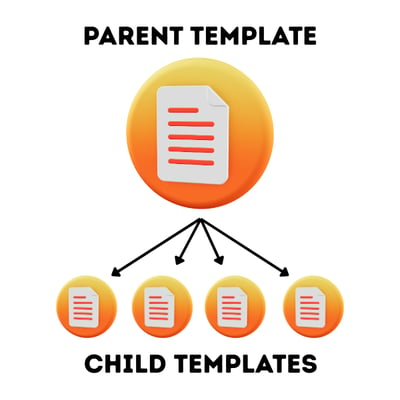
We’ve expanded the flexibility of template management with new parent-to‑child inheritance controls. Planners can now choose whether updates made to a parent template automatically cascade to its associated child templates and events. This gives you more precision in maintaining consistency across large program structures while keeping control where you need it.
Additional Highlights:
- Cleaner Date/Time Formatting in Exports
Data exports now exclude the comma between date and time, making the field easier to sort and more compatible with downstream reporting tools. - New Variable: event.end
A new event.end variable is now available, offering another option alongside event.duration for dynamic messaging and workflows.
Under the Hood: Fixes & Enhancements:
- Bulk API Operation Performance Improvements
Optimized processing for large‑scale API updates to improve reliability and responsiveness. - Updated Header & Help Text
Refreshed terminology in several areas for clarity and consistency.
Version 3.26.0
January 2026
Top Release
Additional Highlights:
- Enhanced Registration Status Filtering
Quickly zero in on the registrants you need. The Left-Hand Navigation now includes a Registration Status filter, making it easier to segment audiences and take action faster - Custom Page Layout Unlocked
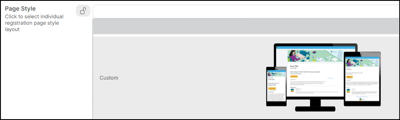
We’ve opened up the fourth page layout — “Custom” — giving you more creative freedom when designing the attendee experience. - Cleaner Chapter Title Presentation
Long chapter titles wrapping oddly? Not anymore. We improved layout and alignment so your content stays tidy and readable.
Under the Hood: Fixes & Enhancements:
- SendGrid Webhook Verification Improved
Registration records now include SendGrid status details, giving you clearer visibility into email delivery outcomes.
Version 3.25.0
January 2026
Top Release
Smarter Event Management with Event Type Filters & Sorting
We’ve introduced two powerful enhancements to help you navigate and manage your events more efficiently:
- New Event Type Filter: Quickly narrow down your event list by type.
- Event Type as a Sortable/Searchable Column: Easily sort or search your events by type, making event admin faster and more intuitive.
Together, these updates bring clearer organization and faster event discovery to your workflow.
Additional Highlights:
- Improved Recording Editing & Chaptering
Recording editing has been redesigned for more reliable chaptering and cropping, giving you better control over post‑event content. - Extended Filter Length
You can now build more complex conditional logic with expanded filter length support.
Under the Hood: Fixes & Enhancements:
- Task Scheduler Redesign
The task scheduler has been rebuilt to better handle errors and improve reliability across automated processes. - UX & Interface Enhancements
Dynamic OTF Results: Ensures smoother review of large filtered lists in email workflows.
.png?width=400&height=320&name=Filter%20(1).png)
Version 3.23.0 and 3.24.0
December 2025
Top Release
Improved Registration Security: Prevent Duplicate Registrations
To help maintain accurate attendee records and eliminate confusion, we’ve introduced a new security feature that stops registrants from registering multiple times for the same event. This ensures cleaner data, prevents accidental duplicates, and supports a more reliable registration experience for both hosts and attendees.
Additional Highlights:
- Sensitivity Column for Questions
You can now quickly see whether a question is marked sensitive or non‑sensitive directly from the question list - no need to drill into each one. - Marketo Integration Enhancements
Expanded Marketo integration capabilities offer more flexibility and improved data flow between platforms. - SendGrid Status Notifications Added
Registration records now include SendGrid email status updates, helping administrators troubleshoot email delivery with ease. - GIF Banner Optimization
Uploaded GIF banner images now undergo compression and optimization for faster load times and improved consistency.
Under the Hood: Fixes & Enhancements:
- Bug Fixes & Stability
Improved Embed Handling for YouTube videos placed in event or template descriptions.

Version 3.22.0
November 2025
Top Release
Teams Integration Now Available (Service Customers Only)
We’re excited to introduce Microsoft Teams integration, enabling EventBuilder to automatically pull attendance, recordings, and chat data from Teams after your event. This streamlines post‑event workflows and ensures your event records are complete and consistent - no more manual exporting or reconciling data.
Additional Highlights:
- Instant UI Refresh After Saving
The Admin/User interface now updates immediately after saving changes - no page refresh required. This includes event/page updates and email enable/disable toggles. - Faster Check‑Ins With QR Auto‑Scan
Scanning a registrant’s QR code in Quick Check‑In will now automatically check them in, eliminating extra steps during busy onsite periods. - Enhanced Invite Email Sending
Invite emails can now be sent using either an uploaded list or individually giving you more flexibility in your communication workflows. - Hyperlinked Images Can Be Styled Correctly
Image links pasted into descriptions can now have widths/heights applied correctly, thanks to improved CSS handling.
Under the Hood: Fixes & Enhancements:
- Content & Editor Enhancements
Word/Outlook HTML Filtering. HTML copied from Word or Outlook is automatically cleaned to prevent rendering issues.

Version 3.21.0
October 2025
Top Release
Faster Pages & Emails with Automatic Image Optimization
To keep your event pages, templates, and listing pages running smoothly, we now automatically optimize and compress uploaded images. This ensures:
- Faster load times
- Consistent rendering across emails and pages
- A more reliable overall experience for your attendees
- No extra steps required — it all happens behind the scenes.
Additional Highlights:
- QR Codes Elevated to Templates
QR check‑in codes can now be enabled at the template level, making it easier to standardize check‑in procedures across events. - Cleaner Text Editing with Improved HTML Filtering
Word and Outlook HTML is now automatically stripped when pasted into the editor, preventing formatting issues or unexpected behavior. - Instant Visibility for Notifications
New software notifications now appear immediately upon login — no refresh needed. - Dynamic Check‑In Notes
The Quick Check‑In console now hides the notes area unless notes actually exist, keeping the interface clean and focused. - Tenant-Level Page Discoverability Setting
A new tenant setting allows all pages to be searchable, discoverable, and indexable — giving you more control over SEO and internal navigation.
Under the Hood: Fixes & Enhancements:
- Security & Data Handling
HTML Input Stripped on Registration. Any HTML entered by registrants is removed for safety and consistency. - User Experience & UI Consistency
Help Text Improvements in Security - Updated contextual help text across three security areas for clarity.
.png?width=400&height=320&name=Untitled%20design%20(12).png)
Version 3.20.0
October 2025
Top Release
Expanded Attendance Reporting for More Insightful Event Metrics
We’ve enhanced the Event Activity Report to include additional attendance detail. You can now clearly differentiate between Virtual, In‑Person, and On‑Demand attendance types — giving you a more accurate, comprehensive view of how participants engage with your events across all formats.
Additional Highlights:
- Subscription Activity Log Added
A new Activity Log in the Subscriptions area helps with tracking changes and troubleshooting. - Recurring Reports Improvements
Added new options in the three‑dot menu, including Export Now and Copy Report Link - Conditional Logic Made More Intuitive
Updated the default conditional logic filter on Questions for a smoother building experience. - Accessible, Properly Sized Presenter Images
Increased the default size of presenter images for Contributors for improved visibility.
Under the Hood: Fixes & Enhancements:
- Security & Input Handling
Registrant-entered HTML is now stripped from the registration modal to prevent unintended formatting or risk. - Event & Email Logic
Improved logic so tasks rescheduled for past times process immediately.
.png?width=400&height=320&name=Untitled%20design%20(11).png)
Version 3.19.0
September 2025
Top Release
Phase 2 Attendance Check‑In Console: QR Codes & More
In this release, we’ve expanded our in‑person event capabilities with major enhancements to the Attendance Check‑In Console. Registrants can now check in using QR codes, speeding up entry and reducing manual processing. We’ve also added new help text and a check‑in notes area, giving onsite teams better tools for managing attendees smoothly and accurately.
Additional Highlights:
- Clear, Consistent Guest Role Permissions
Guest roles have been updated to ensure they can access appropriate areas—and are consistently restricted from others. - Updated Login Page Messaging
Acceptance language has been added to the login page for improved clarity and compliance. - Rescheduled Event Email Accuracy
Email distribution times and dates are now reliably updated when events are rescheduled. - Presenter Image Improvements
Default presenter images have been enlarged for better visibility across the platform.
Under the Hood: Fixes & Enhancements:
- System Performance & Data Handling
Ensured tasks rescheduled for past dates are processed immediately. Disabled the redundant “Welcome User” email to reduce noise. - Filtering & UI Consistency
Added “Canceled” to transactional email filters for more complete reporting. Standardized spelling of “canceled” across the application.

Version 3.18.0
September 2025
Top Release
Smarter On‑the‑Fly Email Scheduling
We’ve expanded our email automation tools to give you even more control. You can now enable multiple On‑the‑Fly (OTF) emails, each configured to send at different times or to specific audience segments. This update makes it easier to deliver timely, targeted communication throughout the lifecycle of your event.
Additional Highlights:
- Enhanced Ranked Order Question Support
Continued improvements to the new ranked order question type, including more intuitive editing capabilities for registrants. - More Flexible Email Logic
Removed locks from inherited/default emails, ensuring conditional logic works smoothly across all templates. - Expanded Filters for Rank Order Questions
Added new filter operators—**“Starts with”** and **“Ends with”**—for more precise data analysis and reporting. - Consistent Variables Across Communications
Standardized which EventBuilder variables are available in communication emails and calendar invites for better consistency and reliability.
Under the Hood: Fixes & Enhancements:
- Platform Reliability & Performance
Implemented validation for uploaded ACL lists to prevent import errors. - Accessibility & Usability
Continued WCAG updates addressing Severity 2 accessibility improvements. Removed support for hyphens in question names to prevent formatting conflicts. - Forms & Questions
Resolved an issue where the response value table disappeared when changing question types.

Version 3.17.0
September 2025
Top Release
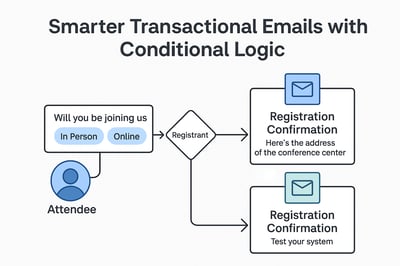
Registrant Tag Logic (see image to the right)
We’ve enhanced how conditional logic works with the Registrant tag in transactional emails. This means you can now tailor confirmation, reminder, and post-event emails based on how attendees answer registration questions. For example, if you're hosting a hybrid event, attendees who choose “in-person” can automatically receive a confirmation email with venue details, while those selecting “online” get guidance on testing their system. This functionality works seamlessly - making your communications smarter and more personalised than ever.
Additional Highlights:
- Live Attendee Count Update
The Event List widget on the dashboard now updates attendee counts in real time - no refresh needed. - Communication Timing Display
The Communications step of an event now shows the exact scheduled/distribution time instead of a relative date.
Under the Hood: Fixes & Enhancements:
- Long Response Display
Improved handling of long response values in questions for better readability.
Version 3.16.0
August 2025
Top Release
New Question Type: Drag & Drop Ranking (see images to the right)
We've improved functionality with a new feature - 'Rank Order Question Types' using drag-and-drop tables. When users create ranking questions - such as asking respondents to order their favorite snacks - the value ordering now updates correctly in real time. Simply add your options (e.g., fruit, cookies, chips, breakfast bar), save the question, refresh the view, and you're ready to go. Respondents can intuitively drag items into their preferred order, and the system captures and reflects those rankings. This new feature ensures smoother interaction and more accurate data collection.
Additional Highlights:
- Tags in Reports
Registration tags now appear in reports and filters, giving you better insight into your audience. - Cleaner Event Filters
Listing pages now start with a filter value that shows you only future events or past events with recordings, making it easier to find what you need. - Buttons That Behave
Action buttons on listing pages now accurately reflect registration status, so what you see is what you get.
Under the Hood: Fixes & Enhancements:
-
Email Time Variables
The variable now excludes seconds - because precision doesn’t need to be pedantic. -
Question Name Formatting
Aligning with standard database character use, Underbars now recognised - name your questions freely. -
Code Editor Upgrade
We’ve swapped the basic text editor for a full-featured code editor in custom head/body content areas. -
Performance Boosts
Public-facing performance has been optimized - faster load times, smoother interactions.
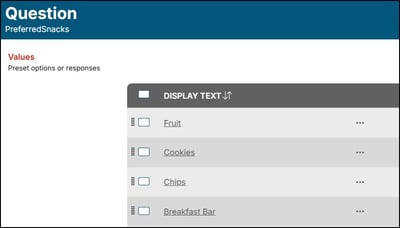
(Above) Ranking Question within Software
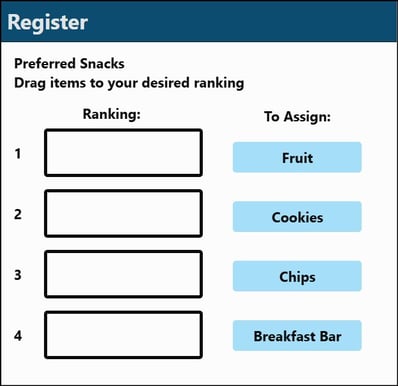
(Above) Ranking Question on Registration Page
Version 3.15.0
August 2025
Top Release
Duplicate Custom Questions (see images to the right)
You can now duplicate custom questions from existing events or templates - making it easier than ever to maintain consistency and save time during event setup. Whether you're reusing a favorite question like “Have you attended any of our webinars or events before?” from a past event, or pulling a tried-and-true question from a template, the new “Copy from Existing” feature lets you select and import questions with just a few clicks.
Only custom questions are shown for selection, keeping things streamlined. Once copied, the questions are yours to edit and use independently - changes made to the original won’t affect your new version. This update is perfect for teams who want to standardize their event builds while keeping flexibility intact.
Additional Highlights:
- On-Demand, Only When It’s Real
If there’s no recording available post-event, we won’t tease you with “On Demand Content.” Clean and honest. - Default Dates That Make Sense
New events now default to one week out instead of one day - giving you breathing room to plan. - Attendee Player Layout Tweaks
We’ve refined the custom info panel for better spacing and visual clarity.
Under the Hood: Fixes & Enhancements:
- Duplicate Page Names? Not Anymore.
We’ve locked that down to keep your content tidy. - Accessibility Wins
Two public-facing items now meet WCAG standards, making your content more inclusive. - Table Property Icons
These now show up properly in light mode - because not everyone lives in the dark (mode).
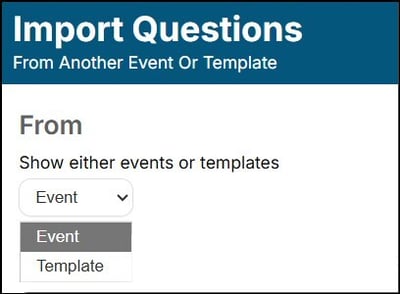
(Above) Duplicate Question selection within Software
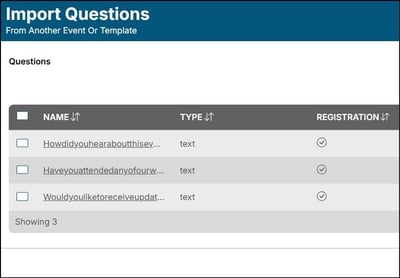
(Above) Duplicate Question Option Screen
Do you have feedback or suggestions?
If you’re facing challenges or have ideas for features you’d love to see in our product?
Our Customer Care team is here to help. We’re always listening.