


If your team uses Microsoft Teams for webinars or virtual events, the registration setup shapes almost every part of the attendee experience. The built-in tools that Teams offers cover many standard needs, however, if you're planning global webinars, multi-language events, or require customer data capture, the basics may not offer what you need.
This guide gives you a clear picture of what the native tools handle well, how to set up your Microsoft Teams registration, when they may start to feel limiting, and how additional support can help as your programs grow.
Getting Started with Native Teams Registration
If you already use Microsoft 365, starting with Teams' built-in registration is a practical first step; the process feels familiar and helps your team get sessions launched relatively easily. Here's how you can make the most of these features:
- Required registration for internal and external audiences
- Standard fields such as name, email, and organization
- Custom questions
- Audience capacity limits
- A simple, 1920x118px banner for brand consistency
- Automatic confirmation messages that include the join link
These options work well for team updates, introductory sessions, and straightforward public webinars.
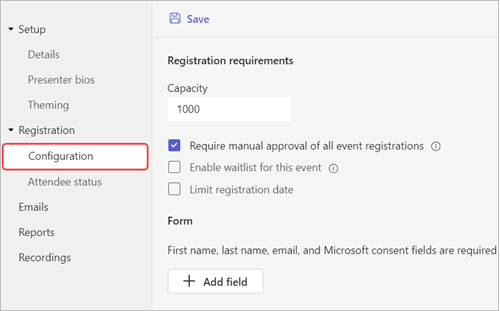
How to Set Up Microsoft Teams Registration
- Require Registration: When scheduling your webinar or meeting, select "Require registration" for internal or external audiences.
- Collect Basic Details: Capture attendee name, email, and organization.
- Add Custom Questions: Teams supports multiple-choice, text input, and checkboxes; ideal for gathering job title, department, or interests.
- Set Capacity Limits: Control event size by defining registration caps.
- Add Branding: Upload a banner image (1920x118px) for visual polish.
- Review Confirmation Emails: Ensure attendees receive the standard "Join event" link and calendar invite.
- Test the Form: Be sure to test on both desktop and mobile.
Signs Your Event Has Outgrown Teams' Native Registration
As mentioned above, Teams registration works well until your event strategy expands. At that point, you may encounter needs that go beyond what Teams registration can support out-of-the-box. Many event teams notice this shift when:
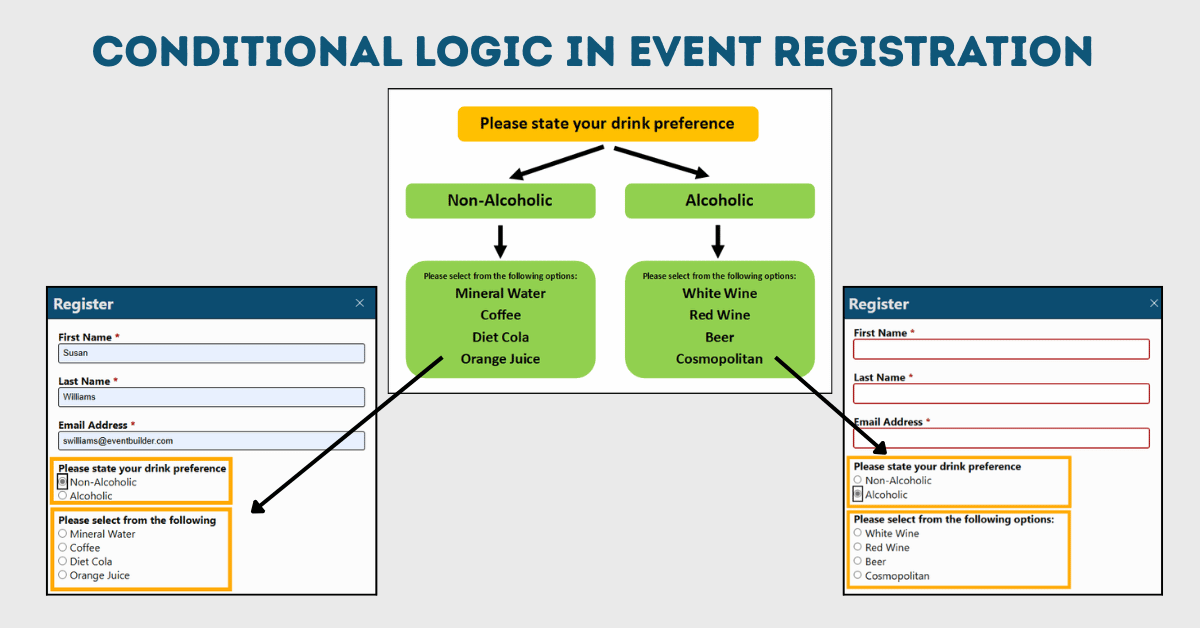
You Need Flexible Branding and Dynamic/Conditional Form Logic
Your team wants registration pages that match your organization's visual identity, or fields that change based on attendee responses.
| Examples of scenarios where conditional logic can add value to your registration forms: |
|
You Need Custom Fields for Precise Data Collection
This often appears when teams connect registration data to CRM systems, track internal learning requirements, or build lead qualification models.
Approval Workflows Matter
Internal training requests sometimes require approval before someone can join.
Your Sessions Reach Global Audiences
Registration, confirmations, and reminders need to appear in different languages. Accurate time zone handling becomes more important.
Your Audience Size Grows
Large programs introduce challenges such as segmented reminders, audience-specific messages, and higher reporting accuracy, and often require data structures that go beyond the native registration form. Manual spreadsheets rarely keep up at this scale.
If these points feel familiar, your team may be stretching the native tools further than they were designed to go.
Expanded Registration Options for Growing Teams
Pairing Microsoft Teams with event management support gives you more room to meet the needs of global, high-volume, or highly detailed programs. A partner experienced in Teams production can help you reduce friction for attendees and simplify the workflow for your internal team.
Advanced Registration Forms for Teams
- Multi-step layouts
- Conditional fields
- Approval routing
- Registration page designs that reflect your brand
Global Attendee Management
- Multi-language registration pages and communications
- Automatic time zone conversion
- Region-specific reminders
These steps reduce confusion, improve attendance, and limit support tickets.
Cleaner Data and Automatic System Connections
- Smooth data delivery into BI tools or other systems via API
- Consistent field formatting for better reporting
Audience-Specific Communication
- Reminders customized and tailored for registrants, attendees, or no-shows
- Follow-up messages and surveys matched to attendance behavior
Production Expertise
A team familiar with both Microsoft Teams and virtual event operations can help you avoid common issues, reduce manual tasks, improve accuracy, keep presenters comfortable on event day, and capture the detailed data your stakeholders need.
Common Scenarios from Real Event Programs
Teams often works well until you encounter:
- Regional training that requires several language versions
- Recurring customer webinars that rely on detailed data capture
- Internal certification programs that need approval
- High-attendance public events
- Audience groups spread across many time zones
While Teams can support these events, adding professional, specialized help makes them easier to create and manage from end-to-end.
Next Steps for Your Event Team
Microsoft Teams event registration is a strong starting point, especially for simple webinars or internal meetings. However, if your events are growing or your team sends too much time troubleshooting registration details, expanding your setup can make the work smoother for everyone involved. For large-scale event registration, managing global attendees in Teams, or multi-language virtual events, it's worth expanding beyond native tools.
By combining Microsoft Teams with expert event management services you get the best of both worlds: secure, familiar technology with advanced registration, reporting, and production support. We are here to support your success and help your attendees feel confident from the moment they register. Get in touch today!

Planning a Global Event with Microsoft Teams?
Download our whitepaper, "The Ultimate Toolkit for Large-Scale Virtual and Hybrid Events on Microsoft Teams."
You'll learn how to:
- Build effective registration workflows beyond native features.
- Manage global attendees across languages and time zones.
- Ensure security and compliance at scale.
- Deliver a smooth, professional attendee experience.
Don't miss this insider secret-filled toolkit!
Disclaimer: This article was created with some help from AI, but thoroughly edited, revised, reviewed, and fact-checked by a living, breathing, coffee-drinking human writer.

Microsoft Teams Meeting Types Explained: Which One Fits Your Event?

Microsoft Teams Event Branding: What You Can and Can't Customize
No Comments Yet
Let us know what you think