


At some point, most event teams hit the same wall: your events are growing, expectations are rising, and your internal team is stretched thinner than anyone wants to admit. That's typically when the question arises:
Do we need outside help?
If you're asking this question, you're in the right place. This guide will help you figure out where your current setup holds, and where it doesn't. Read on!
What Virtual Event Production Actually Involves
By the time your event goes live, a lot has already happened behind the scenes in planning and prep, with more waiting for you on the other side with post-event wrap-up and follow up tasks.
Pre-event tasks typically include:
- Registration setup, including audience segmentation and data capture
- Scheduling across time zones for global presenter teams
- Confirmation, reminder, and post-event follow-up email setup
- Platform configuration
- Security and privacy settings aligned with your audience and content
- Accessibility planning (captioning, translations, screen readers)
- Speaker prep and technical rehearsals
- Pre-event registration data reporting
During the event, it's all about control and responsiveness:
- Live technical support
- Moderation (Q&A, chat, timing)
- Stream management and platform control
- Real-time troubleshooting/issue response
- Attendee survey management
- Attendance and engagement reporting
- Archive and recording management
- On-demand setup
This scope doesn't include content development, speaker sourcing, video production, or event marketing. If your team is expected to do all of this while also managing content and strategy, it may be time to assess whether outside support is a smart idea.
How to Know if You Have Enough In-House Staff
A standard virtual event requires at minimum four distinct roles:
- Organizer - Coordinates the event, manages the team, and owns logistics start to finish
- Producer - Manages the live platform, such as stream controls, content queue, and technical decisions
- Moderator - Handles attendee-facing functions such as lobby, Q&A, timing, and chat
- Presenter - Delivers content, coordinates with the moderator
For smaller events, people can wear multiple hats. However, the more you stack roles, the more risk you introduce, especially when a technical issue arises mid-event and that person is also on camera or managing speaker relationships.
For conferences or summits, layer in:
- Multiple days
- Parallel event tracks
- Scalable staffing for peak event season
- Last-minute changes / unexpected absences
The question then becomes: Can your team cover every role, for every event, without cutting corners?
If the honest answer is "not always," that's a signal.
Is Your Event Software Holding You Back?

Your event software should make your event's execution easier, not add complexity with workarounds and multiple add-ons. Ask yourself these questions about your event tech stack:
- Registration - Can you capture the attendee data your marketing and sales teams actually need? Can you customize fields and design registration pathways?
- Analytics - Does the platform track engagement across the full event lifecycle: pre-, live, and post?
- Reporting - Can you present the data in a format that demonstrates ROI?
- Security and Privacy - Does your platform meet the compliance requirements your organization or industry requires? For regulated sectors this is a non-negotiable.
- Features - Does the platform do what your events require? Is it navigable for attendees who aren't technical?
- Scalability - Will it support your event program as it grows in volume, complexity, or audience size?
If you're saying things like, "we make it work" or "we're not really sure," that's worth addressing before your next high-visibility event.
When Complexity Starts to Outpace Your Team
As the complexity and requirements increase for your events, so does the burden on your internal team. Adding:
- Multiple simultaneous sessions
- Gated or paid access
- Larger or distributed speaker teams
- Stricter compliance requirements
- Accessibility expectations across global audiences
Accessibility alone can be a heavy lift. Captioning, translations, transcripts, scheduled breaks, and pacing all factor into the complexity of an event, and these options are "must-haves" when operating events at the enterprise level.
If your event program includes any of the above and your team is already stretched, outside production support reduces the risk that complexity creates.
What to Look For in a Virtual Event Production Partner
Not all virtual event production companies operate the same way. When evaluating vendors, focus on the following:
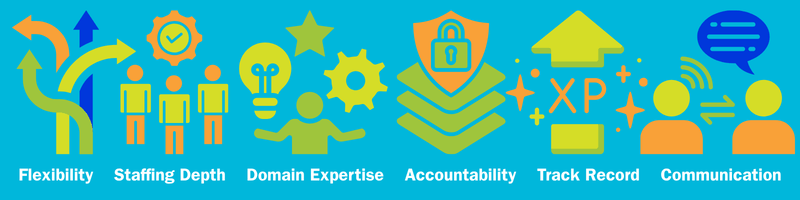
- Flexibility - Can they support both one-off events and an ongoing program? Do they scale with your needs, or only work in one mode?
- Staffing Depth - Do they have enough experienced staff to cover your events reliably, including peak seasons and unexpected changes?
- Domain Expertise - Do they understand the platform, the compliance requirements of your industry, and your event's format complexities?
- Accountability - How do they handle problems when they happen? What does their incident response look like? Ask for an example.
- Track Record - How long have they been operating in enterprise virtual events? Who have they works with at scale?
- Communication - Are they responsive? Do interactions feel like a partnership or a transaction?
How a vendor operates is as important as the experience they bring to the table. Both are worth evaluating before you commit.
How EventBuilder Supports Enterprise Teams
If you're running events on Microsoft Teams and you need consistent, reliable production support such as staffing, moderation, technical management, and reporting, EventBuilder provides this as a managed production partner.
We extend what Teams does natively, without replacing it. Enterprise governance and compliance stay in place, we simply add structured, professional, expert event execution, end-to-end.
FAQ: Choosing a Virtual Event Production Company
1. What does a virtual event production company actually do?
They handle the operational and technical side of running your event, including setup, live supports, moderation, and reporting. The scope varies by vendor and your event needs; some offer end-to-end event lifecycle coverage to your exact needs and specs, others cover only day-of execution.
2. Can production teams work within Microsoft Teams?
Yes, depending on your setup. Some formats support external producers and live stream integrations. Your tenant configuration and event format will help you determine what access your production team needs. Confirm your setup with your IT team first.
3. What should I ask before hiring a vendor?
Ask about their experience with your platform, their staffing model, how they handle live technical failures, what their incident response looks like, and whether they can support ongoing programs or only one-time events.
4. How do I know if my current team can handle our event program?
Map your event calendar against your available roles. If any event requires more coverage than your team can provide, or if you're regularly combining roles that should be separate, that's the gap to address.
5. What's the difference between a producer and a moderator?
A producer manages the platform tasks, such as stream controls, technical decisions, and content sequencing. A moderator handles attendee-facing functions such as Q&A, chat, lobby management, and timing. On smaller events, one person may cover bot, but that increases risk for issues during the live event delivery.
Is It Time to Bring in Support?
Hiring a virtual event company is about recognizing when the expectations, complexity, and risk have outgrown your available resources.
The right partner helps protect the attendee experience, lowers your risk in high-visibility events, and supports your internal team. This type of collaboration matters more when your event program includes multiple sessions, global audiences, compliance requirements, or stakeholders who expect reliable results every time.
If your team is relying on workarounds, combining too many roles, or holding its breath during every live event, that's a sign it may be time to bring in support that knows how to manage all the moving parts.
EventBuilder helps enterprise teams run virtual events with the structure, staffing, technical support, and expertise needed to deliver your Microsoft Teams events with confidence. Get in touch today!

Disclaimer: This article was created with some help from AI, but thoroughly edited, revised, reviewed, and fact-checked by a living, breathing, coffee-drinking human writer.
Troll-Proof Your Virtual Events with a Code of Conduct
What Are Virtual Event Logistics?
No Comments Yet
Let us know what you think