


Simulated Live Webinars in Teams: Confident Delivery at Scale
Simulated live webinars (often referred to as 'simulive') in Microsoft Teams combine pre-recorded presentations with live interaction so you can deliver polished content and still connect with attendees in real time. This guide explains how simulive works in Microsoft Teams, when it fits enterprise programs, and how to run it reliably for high-visibility events.
Who this guide is for: Microsoft Teams owners, event producers, and program managers who support executive communications, internal broadcasts, and customer-facing webinars.
What is a Simulated Live Webinar in Microsoft Teams?
A simulated live webinar ('Simulive') in Microsoft Teams combines a pre-recorded presentation with live, real-time engagement. Attendees watch a high-quality recording inside a Teams Meeting, Webinar, or Town Hall. At the same time, presenters and moderators:
- Answer questions in chat
- Run structured Q&A
- Launch polls
- React to comments and build relationships
You can disclose to attendees that the content is pre-recorded, or just keep the focus on the experience itself. From the attendee perspective, they see a clear, confident presentation paired with live human interaction that feels responsive and authentic.
Own Your Next Simulive Event!
Get the pro tricks you need to deliver a successful simulated live event and more with The Ultimate Toolkit for Large-Scale Virtual and Hybrid Events. Download it today!

Where Simulive Fits Across Teams Meetings, Webinars and Town Halls
Simulated live delivery works across the main Microsoft Teams events types:
Teams Meetings
Best for interactive small to mid-sized sessions where you want:
- Open conversation and on-mic attendees
- Smaller group trainings or internal enablement
- Live chat and reactions alongside the recording
Teams Webinars
Best for structured, registration-based experiences such as:
- Customer and partner education
- Lead generation webinars
- Product or solution briefings
Attendee registration, confirmation emails, and reporting in Teams Webinars pair well with re-playable pre-recorded segments.
Teams Town Halls
Best for large-scale, broadcast-style delivery, for example:
- Executive town halls and all-hands meetings
- Major announcements across business units or regions
- High-visibility internal communications
Simulive in a Town Hall lets you deliver refined content at scale, then bring leaders on camera live for Q&A and closing remarks.
Benefits of Simulated Live Events for Enterprise Teams
Simulated live events in Microsoft Teams support both operational needs and attendee experience.
Consistent Quality and Clear Messaging
Pre-recorded sessions give presenters time to refine talking points, adjust visuals, and confirm that every slide supports the message. That reduces:
- Live stumbling or rushed explanations
- Version drift between different deliveries of the same program
- The risk of missing key compliance or approval requirements
- Presenter fatigue for repeated content delivery
Every audience sees the same, consistent story by a presenter at their best.
More Relaxed, Present-Focused Speakers
Executives and subject matter experts can record when they are rested and prepared. On event day, they can:
- Join as live moderators in chat
- Respond directly to individual questions
- Participate in structured Q&A after the recording ends
This approach supports leaders who have limited availability or comfort with live broadcasting.
Scalable Delivery Across Time Zones
Record once, then schedule the same session at times that serve:
- Global employee populations
- Customers across multiple regions
- Partners or resellers who need consistent training
You keep the same high-quality content and adjust only the live engagement layer.
Lower Production Risk
Playing a polished recording into Teams reduces many common live issues, such as:
- Fluctuating internet connections for presenters
- Audio or screen-share problems
- Last-minute changes to slides or talking points
The production team focuses on monitoring and engagement instead of firefighting.
Accessibility From the Start
With content finalized ahead of time, your team can prepare:
- Captions
- Transcripts
- Language translations
- Accessible slide layouts
This supports a wider range of attendees and aligns with accessibility commitments.
Better Use of High-Value Content
High-demand speakers and flagship sessions require significant effort. Simulive lets you:
- Reuse the same recording for live sessions in multiple regions
- Offer follow-up events with live Q&A on the same core content
- Extend a single recording into an on-demand asset, training module, or evergreen program
The result is more outcomes from each production cycle.
Common Virtual Event Challenges Simulive Helps Solve
Simulated live delivery inside Microsoft Teams addresses familiar issues for teams that run recurring or large-scale virtual events.
Engagement and Production Hurdles
A simulive session uses a live moderator and clear engagement plan. During the pre-recorded segment, your team can:
- Seed Q&A with starter questions
- Respond quickly in chat
- Add polls at key moments
- Share links to related resources
This keeps participants active instead of passive.
Speaker Inconsistency and Burnout
Recording once reduces:
- Quality swings from one delivery to another
- Off-topic detours that can lengthen sessions
- Stress for presenters with frequent live appearances
Your speakers can focus on interaction and follow-up instead of repeating the same talk.
High Production Workload
When recording and editing happen in advance, production teams can give more attention to:
- Promotion and registration flows
- Sponsor deliverables
- Engagement design and follow-up
Live day becomes execution rather than constant triage.
Multi-Track or Multi-Region Programs
Conference-style events inside or alongside Microsoft Teams benefit from simulive. You can:
- Run parallel tracks with pre-recorded sessions
- Stagger schedules by region without booking speakers multiple times
- Keep quality consistent across tracks and time zones
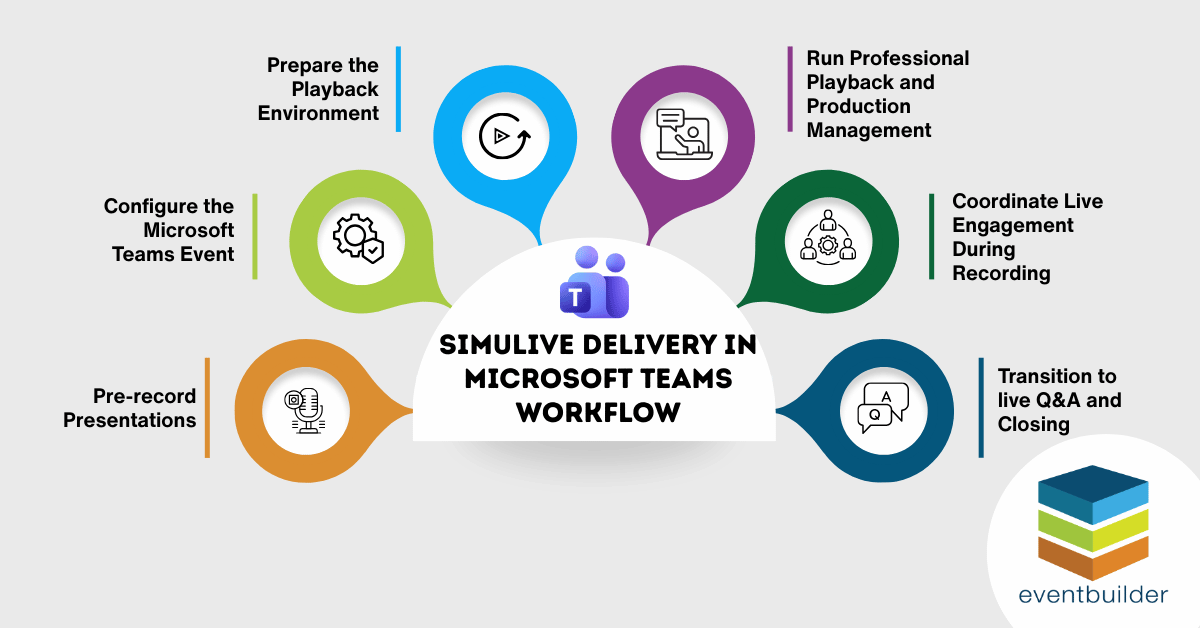
Step-by-Step Workflow: Delivering Simulive Events in Microsoft Teams
There is no single “Simulive” button in Teams. Successful delivery comes from a clear workflow and defined roles.
1. Pre-Record Presentations
Ask speakers to record their sessions ahead of time, through:
- Microsoft Teams recordings
- A dedicated recording tool
- Studio recording for high-stakes events
Light editing can improve clarity, fix small errors, and align slides, audio, and branding.
2. Configure the Microsoft Teams Event
Set up your Teams Meeting, Webinar, or Town Hall as you usually would. Confirm:
- Date, time, and time zones
- Registration options and confirmation emails for Webinars
- Presenter and producer permissions
- Lobby and recording settings
This event is the container where attendees join and where you play the recording.
3. Prepare the Playback Environment
Your producer should confirm:
- Video format, resolution, and audio levels
- Reliable playback method (for example, sharing from a hardware encoder, media player, or a dedicated production tool feeding into Teams)
- Backup files and backup playback devices
The goal is consistent audio and video for attendees.
4. Run Professional Playback and Production Management
During the event, the producer:
- Starts and monitors video playback inside Teams
- Manages transitions between pre-recorded content and live segments
- Watches chat, Q&A, and reactions for any technical issues
- Communicates with presenters in a private backchannel
This keeps the event on time and maintains a smooth experience.
5. Coordinate Live Engagement During the Recording
While the recording plays, presenters, moderators, or subject matter experts:
- Answer questions in chat
- Prioritize items in the Q&A panel
- Launch polls at pre-planned moments
- Share relevant links and resources
- Track sentiment through reactions and comments
This live layer is what makes simulive feel active and personal.
6. Transition to Live Q&A and Closing
At the end of the recording, the producer:
- Fades out or stops the video
- Brings presenters on camera
- Introduces the live Q&A segment
- Manages handoffs between speakers
Presenters can then respond to top questions, clarify key points, and set next steps.
Execution Quality: What Makes Simulive Feel Natural
On paper, simulive sounds simple. In practice, the experience depends on careful timing and production habits.
Key factors include:
- Playing pre-recorded video at a quality level that matches or improves on live presenters
- Timing transitions so they feel intentional rather than abrupt
- Moderating Q&A to keep discussion focused and respectful
- Escalating technical issues quickly through a defined backchannel
- Selecting the right Teams mode based on audience size, interaction needs, and privacy requirements
For high-stakes events such as executive town halls, external briefings, or major internal announcements, experienced producers reduce risk and help presenters stay focused on the message.
Measuring ROI for Simulated Live Webinars in Teams
Simulive events in Microsoft Teams combine your best content with your best engagement patterns. To understand return on investment, watch both cost and impact.
Direct ROI Drivers
- Fewer live production failures or interruptions
- Reduced time and stress for presenters
- Higher participation and interaction rates
- Lower cost per lead for external programs
- Scalable delivery across multiple regions
- Consistent messaging for recurring programs
Metrics to Track
Within Microsoft Teams and your event ecosystem, track:
- Registration and attendance over multiple simulive runs
- Chat and Q&A volume
- Poll participation
- On-demand viewing of recorded segments
- Follow-up actions such as form fills or internal resource usage
These signals show how well your simulive model is working and where to adjust.
FAQ: Simulated Live Webinars in Microsoft Teams
What is a simulated live webinar in Microsoft Teams?
A simulated live, or simulive, webinar plays a pre-recorded presentation while presenters and moderators engage with attendees in real time. Participants watch polished content inside a Teams Meeting, Webinar, or Town Hall while your team answers questions, runs polls, and supports conversation live.
How does simulive differ from on-demand recording?
On-demand recordings offer no real-time interaction. Simulive combines the quality of a refined recording with the responsiveness of live chat, Q&A, and polls, giving attendees a dynamic experience without the risks of a fully live broadcast.
Why do organizations choose simulated live delivery?
Simulive improves consistency, reduces presenter stress, and helps teams scale events across regions. It also lowers production risk because speakers record when they’re ready and rested. On event day, your team focuses on attendees instead of troubleshooting.
What are the main benefits of simulive for enterprise teams?
Simulive strengthens message consistency, reduces production challenges, supports global audiences, and creates a more relaxed experience for presenters. It also makes accessibility and translation easier because teams finalize content ahead of time.
How do you measure success or ROI for simulive webinars in Teams?
Look at registration trends, attendance, chat and Q&A volume, poll participation, on-demand viewing, and follow-up actions. Track improvements in presenter workload, production stability, and consistency across repeated sessions.
Next Steps: Build a Simulive Program that Scales with EventBuilder
Simulated live delivery in Microsoft Teams combines broadcast-quality presentations with authentic live interaction. It gives your presenters space to deliver their best work, supports global audiences, and reduces production stress for high-impact programs.
EventBuilder works with organizations that rely on Microsoft Teams for executive communications, training, and customer-facing webinars. Our producers help design simulive workflows, prepare presenters, and manage event-day production so your teams can focus on content and connection.
If you would like support with a simulive pilot, a high-stakes Town Hall, or a repeatable virtual event series in Microsoft Teams, you can connect with EventBuilder to explore production services, training, or co-delivery options.

The Ultimate Toolkit for Large-Scale Virtual and Hybrid Events on Microsoft Teams
Don't miss our free download, The Ultimate Toolkit for Large-Scale Virtual and Hybrid Events on Microsoft Teams and get all you need to know for delivering amazing Teams-based events from setup and design to analytics. Get it today!
Disclaimer: This article was created with some help from AI, but thoroughly edited, revised, reviewed, and fact-checked by a living, breathing, coffee-drinking human writer.
No Comments Yet
Let us know what you think