


Ever heard of a "mini webinar?" Mini webinars are short, focused online sessions that typically last about 10 to 20 minutes. They're designed to give busy people one clear takeaway on a single topic. These short webinars are a smart way to reach more leads, keep attention high, and build momentum for larger virtual events without the production lift or calendar guilt of a full-length webinar. They're a great solution for short-on-time audiences.
Here's a guide to walk you through what mini webinars are, why they work, how to run them well, and how to measure their impact. Find out if they're a good fit for your virtual event strategy!
What Are Mini Webinars?
A mini webinar is a short, focused online presentation that delivers one main idea in about 10 to 20 minutes. Think of it as a snack-size webinar for people who don't have the time or attention to dedicate to a full hour.
Mini webinars are great for:
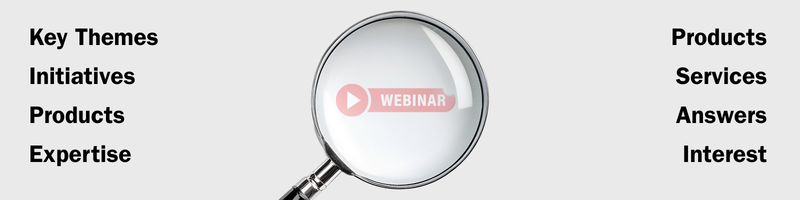
- Introducing attendees to key themes, initiatives, or products
- Go deeper on one specific session from a larger virtual event
- Showcasing your speaker's expertise in a very focused way
- Answering common questions about your products and services
- Build interest in upcoming events/conferences, launches, or flagship webinars
Why Mini Webinars Are Trending With B2B Audiences
Short form content isn't simply a fad. People now consume content in quick bursts, whether in the form of short videos like Instagram Reels and TikTok, skimable articles, or on-demand sessions they can fit between meetings.
Webinar data tells a similar story, with a 57% average viewing rate for webinars clocking in at under 20 minutes, whereas those over 40 minutes drop to 47%.
Mini webinars land right at the intersection of those behaviors:
- They deliver focused value in a small time window
- They're easy to watch live or on-demand
- They feel approachable and not overwhelming
For busy B2B buyers, a webinar that answers one specific question often feels like less of a time drain than hour.
Key Benefits of Mini Webinars for Event Marketing
Why go this route for your webinar programming?
Higher Odds of Completion
Shorter sessions are just easier to finish. When a webinar sticks to one topic and respects the time allotted, audiences are more likely to stick it out all the way through.
That means they're more likely to:
- Hear the entire message or demo
- See your call to action
- Respond to polls or feedback prompts (translation: better data!)
Completion matters, and mini webinars make it easier for attendees to see it all the way through.
Lower Production Effort
Because mini webinars are shorter, they:
- Require fewer slides and talking points
- They're easier for presenters/subject matter experts to prepare
- Can be recorded in batches for different audiences
While you still need planning and polish, you're no longer asking your team to crank out a new hour-long performance every time.
Scalable Event Programs
Mini webinars make it easier to create:
- Short series around one theme
- Role- or industry-specific tracks
- Sessions aligned to different stages of the buyer journey
Instead of one massive webinar trying to serve everyone, you're building a mini webinar library that lets people self-select what's most relevant to them.
Lead Generation with Less Friction
Mini webinars still capture the same valuable data for lead generation as full-length sessions:
- Registrations and contact details
- Attendance and viewing behavior
- Engagement signals like poll responses and Q&A
The commitment feels a lot lighter, which means they often attract people who wouldn't register for a longer event. This keeps your funnel moving without burning out your team.
Built-In Teaser for Larger Events
You might think of mini webinars as trailers for:
- Annual virtual conferences
- Product launches
- Training series
- Multi-session webinar programs
Each mini webinar can spotlight a topic or speaker and end with a low-pressure "want more like this?" invitation to the larger event.

How to Plan a High-Impact Mini Webinar
It's all about the planning. Your mini webinar will succeed or during this stage. Start on the right foot with this simple blueprint:
Set a Clear Goal
Decide what each mini webinar should do for your program:
- Lead Generation - Capture new contacts who match a specific profile
- Education - Help current customers or prospects solve a focused problem
- Event Promotion - Build excitement for an upcoming flagship event
- Adoption or Onboarding - Help existing customers get more from your product
Write that goal in one sentence and keep it visible while planning.
Choose Specific Topics
The best mini webinar topics are:
- Narrow enough for a single 10-20 minute session
- Directly linked to a real audience question or pain point
- Connected to a larger theme or campaign
Examples:
- "How to choose the right webinar format for a training program"
- "Five mini webinar topics that convert conference interest into registrations"
- "How to use polls to increase engagement in short webinars"
Consider choosing a successful session from a past event and create a mini webinar version that focuses on the most practical parts.
Decide on Format and Structure
Common formats include:
- Live - Great for interaction and QA
- Simulated Live - Pre-recorded content with live chat and moderation
- On-demand - Available anytime as part of a resource library
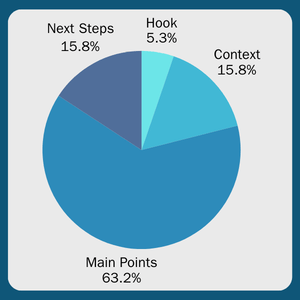
A structure that works reliably:
- Hook (1 minute) - Name the problem and promise the takeaway
- Context (2-3 minutes) - Why this matters right now
- Main Points (10-12 minutes) - Three to five clear, actionable ideas
- Next Steps (2-3 minutes) - One CTA and helpful resources
Choose the Right Speaker
Short formats reward focus. Look for speakers who can:
- Stick to the point
- Explain one idea clearly
- Engage with polls or chat without derailing the session
A simple outline and timing guide helps speakers stay confident and on track.
Mini Webinar Production and Promotion Tips
Setup and promotion are where successful mini webinars are made.
Create Content That Earns Attention
In a 10-20 minute session, everything counts.
- Start with a clear promise: "In 15 minutes, you'll know how to..."
- Keep slides simple: one idea per slide
- Use visuals, short demos, or screen walkthroughs where helpful
Clear visuals and demonstrations matter even more when time is tight.
Rehearse for a Smooth Delivery
Even a short webinar needs a thorough run-through.
- Do a full, timed rehearsal
- Test audio, video, screen sharing, and polls
- Review handoffs between host and speaker
This is where having an experienced virtual event team can make a big difference, especially for presenters who are new to shorter formats.
Promote the "Short and Focused" Value
Make the time commitment obvious by:
- Include the length in the title. For example, "15-Minute Mini Webinar"
- Call out the one outcome attendees will get
- Emphasize that it's built for busy schedules
Promote through:
- Email and nurture campaigns
- Social posts with short clips or quotes
- Website banners or resources hubs
- In-product messages for customers
Repurposing Mini Webinars Into Always-On Content
Mini webinars really shine when you stop treating them as one-and-done events.
Record and Host On-Demand
Always record mini webinars and:
- Add them to an on-demand library
- Tag by topic, role, and funnel stage
- Include them in follow-up and nurture emails
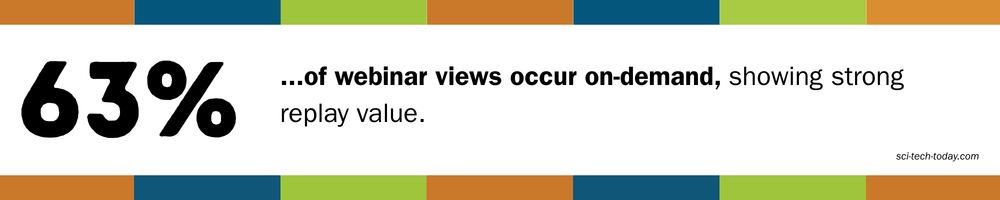
A large share of webinar views now happen after the live session.
Turn On Mini Webinar Into Many Assets
From a single, 15-minute webinar, you can often create:
- One or two blog posts
- Several short social clips
- A short email series
- Help center onboarding content
Same message, more reach, less work.
Build a Mini Webinar Library
Over time, organize content into:
- Topic playlists
- Persona-based tracks
- Collections tied to events or launches
How to Measure Mini Webinar ROI
Mini webinars still need to earn their place in your strategy. Fortunately, the data is already there.
Think in three phases: before, during, and after.
Pre-Webinar Metrics
These show whether your topic and promotion resonate:
- Registration volume
- Registration sources
- Audience profile (role, industry, region, company size)
Compare topics and formats over time to see what attracts the right people.
Engagement Metrics
These show how the session performs:
- Attendance rate
- Live vs on-demand views
- Completion rate
- Poll participation
- Q&A activity
- Simple sentiment or feedback signals
Shorter formats often make it easier to keep attention all the way through.
Post-Webinar Outcomes
This is where results connect to the business:
- Leads captured
- Follow-up actions (downloads, demos, trials)
- Pipeline influence
- Survey feedback
Start simple, and add depth as your program matures.
Mini Webinar Best Practices and Takeaway Tips
1. Maintain Consistency
- Publish on a predictable cadence
- Use a repeatable title and layout structure
- Consider a series name of "mini webinar" label
2. Plan for Interaction
Even short sessions benefit from engagement:
- One or two polls
- Time for Q&A or chat
- Invitations to share experiences or questions
3. Treat Analytics as Feedback, Not Judgment
You're learning, not grading yourself:
- Review trends regularly
- Ask audiences what they want next
- Adjust topics, length, or CTAs based on real data
Mini Webinar FAQs
How long should a mini webinar be?
Most work best between 10-20 minutes: enough time to teach one thing well and move on.
When should I choose a mini webinar instead of a full webinar?
Use mini webinars when you want to answer a focused question, tease a larger event, or support a specific step in the buyer journey.
Are mini webinars better live or on-demand?
Both. Live sessions build connection, while on-demand extends reach. Many teams do both.
Do mini webinars work for complex products?
Yes, when you break complexity into smaller topics instead of cramming everything into one session.
How EventBuilder Can Support Your Mini Webinar Program
If mini webinars sound like a fit, you don't have to figure it out alone. EventBuilder works with teams that want to:
- Design repeatable mini webinar series
- Manage registration, reminders, and delivery
- Capture and interpret engagement data clearly
Whether you're testing your first 15-minute session or building a full mini webinar library, our team helps keep things simple for hosts and engaging for attendees.
If you'd like to walk through your ideas for your own program, reach out to EventBuilder and connect with a real, live event expert. We'll happily partner with you to help make your mini webinar program a smashing success. Let's get you launched!

Disclaimer: This article was created with some help from AI, but thoroughly edited, revised, reviewed, and fact-checked by a living, breathing, coffee-drinking human writer.
Webinars: The Ultimate Must-Have Lead Magnets
How to Create a Webinar That Doesn't Suck

No Comments Yet
Let us know what you think