


Getting your Microsoft Teams event options wrong usually shows up as a capacity limit or a missing registration report, right when you can least afford it. This guide breaks down the options that matter so you can configure the right experience before you build it.
Which Microsoft Teams Meeting Type Should You Use?
Microsoft Teams offers three formats you can schedule today: Meetings, Webinars, and Town Halls. Use a Meeting for full interactivity with up to 1,000 participants, a Webinar when you need Teams' native registration, and a Town Hall for broadcast-scale audiences. Teams configures each event type around your audience size, interaction level, and registration needs.
Microsoft 365 Business and Frontline plans include foundational event features, with up to 1,000 registered attendees and 10,000 without registration. Enterprise licenses raise the registered limit to 3,000 and add advanced features, including Simulive, immersive events, RTMP-in/out, VOD publishing, and advanced layouts. Attendee Capacity Packs extend events to 100,000 on Enterprise licenses, and Hide Attendee Names works on every tier.
Available Microsoft Teams Format Options
Microsoft Teams covers three formats you can schedule today: Meetings, Webinars, and Town Halls. A fourth, Live Events, is winding down and covered separately below. Each active format trades interactivity for scale differently, and each has its own registration, reporting, and control options. The organizer's license determines which advanced options are available, including production, management, customization, and analytics features.
Webinars and Town Halls are both built in the Microsoft Teams Events app, Microsoft's unified hub for event creation. Instead of a separate build process for each format, you start from scratch or from a template (Webinar and Town Hall are both listed as template options). Next, set capacity, registration, and audience together in one flow. Standard Meetings are scheduled differently, through the regular Teams or Outlook calendar, a simpler path that doesn't go through the Events app at all.
Start With Three Questions
The Events app configures your event around the same three questions, whether you start from scratch or a template.
- Audience. Internal, external, or mixed? Any privacy or compliance requirements?
- Interaction level. Does everyone need to speak and share, or is this presenter-led with structured Q&A?
- Data needs. Do you need registration, attendance reports, or engagement data when the event ends?
The table below maps each format against those three questions.
How Do Meetings, Webinars, and Town Halls Compare?
| Format | Best For | Attendee Experience | Capacity |
| Teams Meeting | Collaborative sessions, internal training, small group breakout sessions | Everyone can speak, share video, & collaborate. Lobby configuration supported | Up to 1,000 fully interactive, plus up to 10,000 view-only |
| Teams Webinar | Structured presentations with registration | Presenter-led, with lobby controls and reporting | 1,000 or 3,000 registered (by license); 10,000 without registration; up to 100,000 with Attendee Capacity Packs |
| Teams Town Hall | Large-scale, one-to-many broadcasts | Limited presenters, attendees use Q&A, and reactions instead of open mics. RMTP-in/out and advanced production features with Enterprise licenses | 1,000 or 3,000 registered (by license); 10,000 without registration; up to 100,000 with Attendee Capacity Packs |
| Teams Live Events | Closed to new scheduling as of 6/30/2026 | Produced broadcast, moderated Q&A | Already-scheduled events run through 2/28/2027; no new events can be scheduled |
Registered-attendee limits depend on the organizer's license: 1,000 on Microsoft 365 Business and Frontline plans, and 3,000 on Enterprise licenses. Registered events above than 3,000 attendees, or any event above 10,000 require Attendee Capacity Packs assigned to the organizer. Capacity packs are only available with Enterprise licenses.
Source: Microsoft Learn, Teams meetings and events feature and capacity comparison
Which Teams Format Fits Your Event?
- Internal team sync or working session → Standard Teams Meeting.
- Interactive sessions, such as training, with registration and support → Teams Meeting with EventBuilder for registration, security, moderation, support, and reporting.
- Training that needs small group breakouts → Teams Meeting, or a Teams Webinar with up to 1,000 participants.
- Customer webinar with simple registration and follow-up → Teams Webinar. Add EventBuilder for complex registration flows and multi-event listings.
- Webinar or Town Hall with more than 1,000 registered attendees → Assign organizers an Enterprise license. Registered events above 3,000, or any event above 10,000 also need Attendee Capacity Packs.
- Company-wide Town Hall with executive presenters → Teams Town Hall. Consider EventBuilder for registration and production support at scale.
- Produced broadcast using an external encoder → Teams Town Hall, with an Enterprise license for RTMP-in.
- Large announcement, and you already have a Live Event scheduled → let it run as planned, since anything booked before June 30, 2026 continues through February 28, 2027.
- Large announcement, and you're starting from scratch → Teams Town Hall. Live Events is closed to new scheduling.
- Multi-day virtual summit or conference → Combine Meetings, Webinars, and Town Halls with EventBuilder handling program-level registration, listing pages and reporting.
How to Build a Webinar or Town Hall
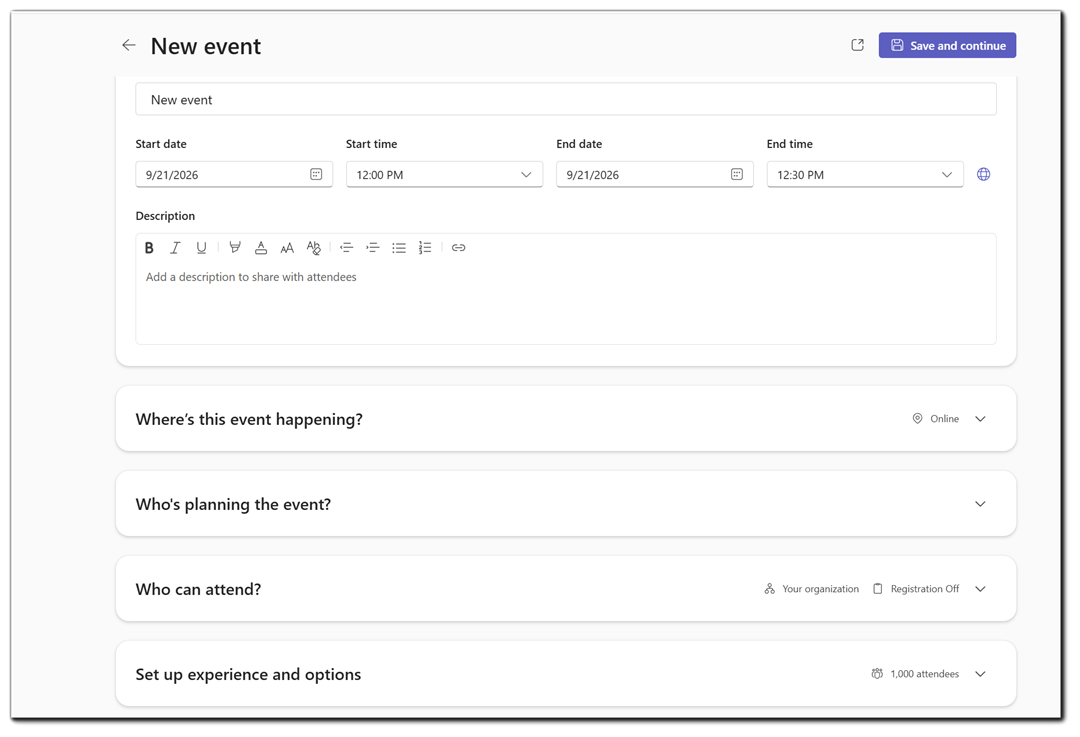
The Events app walks you through this in order:
- Open the Teams Event app and select Create event. (Note: As of April 1, 2026, Webinars and Town Halls are created in the new unified Events app.)
- Choose from scratch, or start from a Webinar or Town Hall template.
- Add the basics: name, description, date, and time.
- Assign organizers and presenters, which controls green room access and on-event permissions.
- Set your audience (registration, internal, external or mixed), and turn registration on or off.
- Set up experience and options: configure capacity and interaction settings, including the 'Optimize for large audience' toggle for bigger events.
- Publish, which generates your attendee link, registration page, and organizer invites.
If configured, recording and transcription start automatically once you begin the event. Confirm your organization's recording policy before you publish, particularly for events with external attendees.
When to Use a Standard Teams Meeting
A standard Teams Meeting is the right call when interaction is the primary objective. Every participant, up to 1,000 people, can unmute, turn on video, and share content. A view-only stream extends reach to 11,000 total for overflow audiences, though additional viewers can't participate.
Choose a Teams Meeting If:
- Your priority is collaboration and discussion (as opposed to a formal broadcast).
- You expect under 1,000 interactive participants.
- You want breakout rooms for small-group work. Meetings support up to 200 breakout rooms and 1,000 active participants.
Identity Visibility
Standard Teams Meetings show every participant's name to everyone by default, because the format is built for open collaboration. Sessions that need hidden attendee identities fit better in a Webinar or Town Hall.
What the New Teams Premium License Adds to Meetings
The new version of a Teams Premium license is an add-on that brings these features to standard Teams Meetings:
- Watermarking
- Sensitivity label enforcement
- Restricted meeting join
- Advanced lobby controls
- AI-driven intelligent recaps
- Custom organizational branding
Premium's branding applies to Meetings. Event customization for Webinars and Town Halls comes with Enterprise licenses.
Organizations don't need to purchase a Teams Premium add-on seat for every employee. The add-on features apply to meetings scheduled by an organizer who holds the license.
When to Use a Teams Webinar
Teams Webinars add registration, confirmation emails, lobby controls, and defined presenter and attendee roles on top of the Meeting foundation. This is the format built for lead-generation sessions, partner training, and any event where you need to know who showed up.
Webinar capacity depends on the organizer's license. Microsoft 365 Business and Frontline plans support up to 1,000 registered attendees, and Enterprise licenses raise that limit to 3,000. Both tiers allow 10,000 attendees without registration, and Attendee Capacity Packs extend events to 100,000. Teams that assumed Webinar meant "capped at 1,000" now have three times the registered capacity on Enterprise licenses.
The advanced features available in Teams Enterprise also include:
- Simulive and VOD publishing
- RTMP-in/out (region dependent)
- eCDN for large-scale delivery
Choose a Teams Webinar If:
- You want registration, confirmation emails, and attendance reporting without adding separate tooling.
- You need attendee permission controls and/or identity privacy controls a standard Meeting doesn't offer.
- Your registered audience could exceed 1,000 people and your organizer(s) hold Enterprise licenses.
- You need advanced production feature (Simulive, VOD, RTMP-in/out) but don't need the full broadcast model of a Town Hall.
- Your need for breakout rooms doesn't exceed capacity (breakout rooms are not supported for webinars with over 1,000 participants).
When to Use Teams Town Hall
Town Hall is Microsoft's format for the largest one-to-many events: executive town halls, company-wide announcements, investor briefings, and other broadcast-style sessions. A small number of presenters deliver content to a large audience, and attendees participate through Q&A, reactions, instead of open microphones, and can follow along with captions.
Town Halls follow the same license-based limits as Webinars. Microsoft 365 Business and Frontline plans support up to 1,000 registered attendees, and Enterprise licenses raise that limit to 3,000. Both tiers allow 10,000 attendees without registration, and Attendee Capacity Packs extend events to 100,000. For events over 20,000 attendees, Microsoft recommends engaging Teams Events Services directly instead of planning a standard self-service build.
The advanced features available in Teams Enterprise also include:
- Simulive, VOD publishing, presenter bios, and advanced layouts
- RTMP-in/out (region dependent) for external encoder workflows
- Microsoft eCDN for optimized large-scale streaming
Choose a Teams Town Hall If:
- Your event is broadcast-style: a small number of presenters, a large audience.
- You need Q&A and reaction-based engagement rather than open discussion.
- You need advanced production features/tools (Simulive, VOD publishing, RTMP-in/out,) and your organizer(s) hold Enterprise licenses.
- Your audience could scale well past 1,000 and the event doesn't need breakout rooms.
Teams Live Events Retirement
Live Events is being retired. Microsoft closed it to new scheduling on June 30, 2026, so if you don't already have a Live Event on the calendar, this format is no longer an option for you. Any Live Event scheduled before the cutoff can still run, but only through February 28, 2027.
Organizations with recurring broadcast-style programs should move them to Town Hall before that date, since Town Hall is the closest match for one-to-many, produced broadcasts. Produced workflows that rely on an external encoder need RTMP-in, which comes with Enterprise licenses, so confirm organizer licensing as part of the move. Our guide to planning large-scale Microsoft Teams events covers the staffing, budget, and production decisions that come with it.
2026 Teams Event Licensing Changes
Microsoft changed Teams event licensing twice in 2026. On April 1, it moved many Teams events capabilities, including Simulive, immersive events, and expanded host controls out of Teams Premium and into Teams Enterprise. In late September 2026, Microsoft grouped those capabilities into foundational and advanced tiers and tied each tier to specific licenses (Microsoft 365 Message Center, MC1479512).
Foundational event features come with Microsoft 365 Business and Frontline plans and support up to 1,000 registered attendees. Advanced features come with Enterprise licenses (Office 365 E1, E3, and E5; Microsoft 365 E3, E5, and E7) and raise that limit to 3,000. Organizations on legacy Teams Premium licenses keep advanced event features.
The new Teams Premium license no longer includes Teams Events capabilities It's an add-on for standard Teams Meetings, covering advanced meeting protection, meeting branding, AI-powered intelligence features, and the Queue app. Premium complements Enterprise licensing, and one organizer can hold both.
The short version for anyone planning a Teams event: before April 2026, running a large event usually required Teams Premium. Now an Enterprise license covers the full set of Teams Events features, with Attendee Capacity Packs for registered events larger than 3,000 attendees. Premium is optional and applies to Meetings, so add it for meeting-level protection and/or branding.
Foundational and Advanced Event Features Side-by-Side
Source: Microsoft's feature and capacity comparison
| Category | Foundational Event Features | Advanced Event Features |
| Included with: | Microsoft 365 Business Basic, Standard, and Premium; Microsoft 365 F1 and F3; Office 365 F3; Office 365 A1 and Microsoft 365 A1; Office 365 and Microsoft 365 A3/A5 for Students; Microsoft Teams Essentials, Exploratory, and Trial | Office 365 E1, E3, and E5; Microsoft 365 E3, E5, and E7; Office 365 and Microsoft 365 A3/A5 for Faculty; Teams Premium Legacy |
| What it covers: | Creating and running Teams events | Foundational features plus: added controls for event production, management, engagement, customization, and analytics |
| Number of events | No limit | No limit |
| Attendees with registration | Up to 1,000 | Up to 3,000, or up to 100,000 with Attendee Capacity Packs |
| Attendees without registration | Up to 10,000 | Up to 10,000, or up to 100,000 with Attendee Capacity Packs |
| Attendee Capacity Packs | Not available | Attendee Capacity Packs, assigned to the organizer, extend events to 100,000 |
| Production Features (Simulive, immersive events, RTMP-in/out, VOD publishing, advanced layouts) |
Not included | Included (RTMP-in/out is region dependent) |
| Hide attendee names | Included | Included |
| Note: For both license tiers, Meetings now support up to 200 breakout rooms and 1,000 active participants. | ||
Sources: Microsoft 365 Message Center, MC1479512 (September 2026), and Microsoft Learn, Teams meetings and events feature and capacity comparison. The new Teams Premium doesn't add Teams Events features to either tier.
Dive Deeper: For the full breakdown of what this licensing shift means for program-level planning, budget, and vendor evaluation, see Large-Scale and Hybrid Microsoft Teams Events.
How Does EventBuilder Extend These Teams Event Types?
Teams runs the meeting and event experience. EventBuilder supports your event design and delivery when your programs get large, complex, or reporting-heavy. We offer:
- Registration and access. Branded registration pages, allowlists, denylists, and registrant verification across Meetings, Webinars, and Town Halls.
- Program-level reporting. Attendance, engagement, and recording-consumption data across an entire event series or a single session, with Microsoft Power BI integration.
- Production support. Planning, rehearsal, and live support for high-volume or high-visibility Teams events.
- Real-time support. 24/5 phone and email help from event experts who know your program, for presenters and attendees alike.
- Security and compliance. EventBuilder holds ISO 27001 and ISO 27701 certifications and EU Data Privacy Framework certification.
As a Microsoft Preferred Supplier, we've supported more than 75,000 of Microsoft's own events with our professional event services and software since 2016, including high-volume programs Microsoft runs for its teams and partners world wide.
Talk to us about how EventBuilder can help you with design, registration, reporting, and production support for your next Teams event program.
FAQ: Microsoft Teams Meeting Types
1. Do I need to choose a format before I start building my Teams event?
Not for Webinars or Town Halls. Both are built in the Microsoft Teams Events app, where you start from scratch or a template and configure capacity, registration, and audience together in one flow. Standard Meetings are scheduled separately, through the regular Teams or Outlook calendar.
2. What's the real difference between a Teams Meeting and a Teams Webinar?
A Teams Meeting is built for two-way communication: everyone can speak, share video, and present. A Webinar adds registration, confirmation emails, and separated presenter and attendee roles on the same underlying infrastructure.
3. Do Microsoft Teams Webinars support breakout rooms?
Yes, for Webinars with up to 1,000 participants. Breakout rooms aren't available above that size, and Town Halls don't support them at all. Larger events that need small-group work can pair the main session with separate breakout Meetings.
4. Do I need Teams Enterprise to run a large Teams event?
You need an eligible Teams Enterprise license for advanced event features or more than 1,000 registered attendees. Microsoft 365 Business and Frontline plans support up to 1,000 registered attendees and 10,000 without registration. Enterprise licenses raise the registered limit to 3,000, and Attendee Capacity Packs assigned to the organizer extend registered events past 3,000 and any event past 10,000, up to 100,000.
5. Can I switch Teams formats if my event grows?
Not mid-event. You'll need to plan the format based on your expected audience before you build the event, since Meetings, Webinars, and Town Halls are configured differently from the start. Confirm the organizer's license supports the registered audience you expect, and with an uncertain audience, size up rather than down.
6. Should I use Teams Live Events or Town Hall for a new broadcast-style event?
Town Hall. Microsoft closed Live Events to new scheduling on June 30, 2026. If you already have a Live Event on the calendar, it can still run through February 28, 2027, but no new ones can be booked.
7. When does it make sense to bring in EventBuilder instead of running a Teams event on our own?
When registration complexity, multiple levels of security configurations are needed, production support, and/or multi-event reporting exceeds what your internal team has bandwidth for, particularly for high-volume programs or events with elevated security and compliance requirements.
Still Not Sure Which Teams Format to Use?
Most of the decision comes down to the three questions from the start: audience size, interaction level, and what event data you need. Sometimes none of the three current formats fits clearly, or your event has outgrown a single Teams license. That's the point to bring in a dedicated event partner.
Talk to us about your event, and we'll help you map the right format, licensing tier, and registration setup for your next Teams event and programs. Contact us today!

Disclaimer: This article was created with some help from AI, but thoroughly edited, revised, reviewed, and fact-checked by a living, breathing, coffee-drinking human writer. Any and all em dashes were strictly human-created.
How to Run Secure, Compliant Town Hall Events on Microsoft Teams
Microsoft Teams Event Branding: What You Can and Can't Customize
No Comments Yet
Let us know what you think