


A virtual event can look simple on the surface, but the behind the scenes may tell a different story. Whether you're planning a small webinar or a large virtual conference, learning what your virtual event management team's roles and responsibilities are and developing an event staff training and implementation roadmap is critical to your success.
Who this guide is for: If you're planning webinars, training sessions, or virtual conferences and find yourself wondering who should do what, you're in the right place: this guide is for you. You'll learn the key virtual event roles and responsibilities, how they work together, and practical steps to get your team prepped and ready.
Why Virtual Event Roles Matter
Virtual events are deceptively complicated! There are many moving parts, including content, technology, presenters, attendees, accessibility, and follow-up to name a few. By defining clear roles, you:
- Prevent last-minute confusion or gaps
- Give presenters and staff confidence in their tasks
- Support attendees with a calm, professional experience
- Capture data and insights you can use for future events
Running a smooth, professional event requires understanding the key roles your virtual event staff will play in making that sought-after seamless attendee experience happen. The good news? The flexibility of virtual events and conferences gives you the power to design your event staffing in whatever way works best for your situation.
Core Virtual Event Roles and Responsibilities
Here are the common virtual event staffing roles and their typical duties:
Organizer
The event organizer's role is similar to a project manager or team lead. Generally, the organizer directs the full lifecycle of the event, from the initial idea and development, the implementation of the event's goals, strategy, execution, and post-event follow-up and reporting. Typical responsibilities:
- Define event topic, goals, audience, and success measures
- Build a realistic event timeline with key milestones
- Event scheduling, rescheduling, canceling, and manage outbound communication
- Coordination with internal shareholders and procure/confirm presenters
- Create the event agenda, including segments, timing, and breaks
- Assign roles and keep everyone aligned on expectations
- Oversee registration form and landing page aligned with company and event branding guidelines
- Logistics, including management of event technology and IT support
- Assessing event staffing needs and any training necessary
- Confirm technology choices and IT support, including backups
- Assess staffing needs and identify training requirements
- Plan event promotion, including email, social, and partner channels
- Monitor registration and waitlists, and adjust promotion if needed
- Coordinate presenter prep, including training/coaching and content reviews
- Arrange accessibility services, such as live captioning and ASL interpreter services, when requested
- Schedule and lead the event rehearsal to test technologies and workflows
- Stay available on event day to make decisions and assist with troubleshooting
- Manage recording access, post-event communications, and reporting
Where Training Helps the Organizer
- Familiarity with the virtual event platform's host tools
- Basic understanding of audio, video, and accessibility options
- Comfort reading event reports and turning them into simple insights
Organizing and overseeing virtual events isn't for the faint of heart! For organizers, making certain you have reliable technology and professional event staff is a key success factor.
Moderator or Host
Event moderators can wear several hats during the live event, and because they have direct interactions with both presenters and attendees, professionalism, a calm demeanor, and decisiveness are vital skills for them to have. An experienced moderator can be the driver of your event's success! Moderator tasks typically include:
- Align with the event organizer on expectations and run-of-show
- Attend the event tech rehearsal/run-through to learn the layout, tools, and cues
- Welcome presenters on event day and confirm audio video, and screen share
- Queueing presentation materials, including slides and video
- Greet attendees, set expectations for chat and Q&A, and review basic controls
- Keep the event on time by guiding transitions and announcing breaks
- Facilitating attendee/presenter Q&A and panel discussions, including time checks
- Offer basic technical guidance to attendees who need help joining or hearing
- Watch for disruptive behavior and apply chat or attendee controls as needed
- Wrap up the event, thank participants, and explain what happens next
- Debrief with the organizer after the event to share feedback and report any issues
Where Training Helps the Moderator
- Clear language for setting expectations and defusing tense situations
- Hands-on experience with attendee and presenter controls
- Tips for speaking with warmth and clarity on a live session
Presenter(s)
The stars of your event, presenters without an engaging, dynamic delivery style and finesse means your virtual event could fall flat. Good presenters are thought leaders and/or subject matter experts who prepare stellar presentation materials and are either well-versed in your event tech or comfortable being trained. Presenter tasks may include:
- Define the topic and key learning outcomes together with the organizer
- Prepare accessible presentation materials that match brand guidelines
- Plan specific audience interaction points, such as polls, chat prompts, and/or Q&A
- Test the presentation setup: camera position, lighting, sound, background, internet connectivity, and other tech
- Practice the presentation delivery with attention to timing and transitions
- Provide headshot, bio, and any promotional materials by agreed upon deadlines
- Provide pre-recorded content and review with organizer prior to rehearsal
- Attend rehearsal to practice handoffs with the moderator and test content
- Join the event early on the live day for final checks and briefings
Where training helps presenters
- Orientation to the virtual event platform and presenter tools
- Guidance on speaking to camera and managing nerves
- Support in making slides and demos more accessible and engaging
Investing in skilled event coordinators and staff, combined with reliable event technology, gives you the best chances for events that are engaging, professional, and most of all: successful!
Supporting Roles that Strengthen Your Virtual Event Team
Not every virtual event needs all the roles listed below, but keep these in mind as your program grows. These supporting roles can alleviate pressure from your core team and improve the attendee experience.
Speaker/Presentation Coach
Regardless of whether your presenter is an old pro or they're new to presenting in a virtual event, invest in training for your speaker to help them be polished, comfortable, and relaxed during their presentation. From refining content flow to offering tips on managing stage presence in a virtual setting, coaching supports presenters in delivering their best performance. Typical responsibilities include:
- Review content for clarity, pacing, and alignment with audience nerds
- Suggest ways to increase interaction, such as polls, chat prompts, or live demos
- Support presenters during rehearsal during rehearsal and share notes afterward.
Sales/Marketing - Including Graphics
Tap your sales and marketing teams to help you connect your virtual events to your broader programs, cultivate partnerships, support your promotional efforts, and follow-up plans. Typical responsibilities:
- Help define the audience and value proposition for the event
- Create or support promotional materials such as emails, social posts, banners, and graphics
- Coordinate with partners or sponsors when relevant
- After the event, review attendee and engagement data to identify qualified leads
- Build nurturing sequences for follow-up content, meetings, or future events
Audio/Visual Specialists
A/V specialists focus on the technical quality of sound and video. Typical responsibilities include:
- Recommend and configure microphones, cameras, and lighting
- Assist presenters in setting up home or office spaces for a professional look
- Support pre-event testing of equipment, scenes, and media
- Help define which metrics matter most for your goals, such as attendance rate, chat activity, or conversions
Reporting/Data Specialist
A data specialist transforms event metrics into actionable insights and information your team can use. Since post-event reporting and analytics are a key part of the virtual event lifecycle, they take the data collected and create meaningful reports, helping to shape future programming, refine target event audiences, and evaluate ROI. Specialists with Power BI experience can be especially helpful for data visualization and presentation.
- Integrate event platform data with analytics or CRM tools
- Build dashboards or reports that highlight attendance, engagement, and follow-up actions
- Help define which metrics matter most for your goals, such as attendance rate, chat activity, or conversions
- Share insights that inform future topics, formats, and timing
For more in-depth content on this subject, check out our
Virtual Event Planning and Strategy Learning Hub
Training Your Virtual Event Staff
Once you know which roles you need, build a simple training plan that covers:
- Platform Orientation
- Short walkthroughs for organizers, moderators, and presenters
- Role-based checklists for the live day
- Run-of-Show Rehearsal
- A full test with presenters, the moderator, and the organizer
- Tech checks for audio, video, screen share, and interactive tools
- Clear backup plans for audio or connectivity issues
- Accessibility and Inclusion
- Guidance on captions, transcript availability, and readable slide design
- Inclusive language and interaction practices
- Post-Event Review
- A 15-30 minute internal recap to discuss what worked and what to adjust
- Quick updates to your templates or checklists based on lessons learned
You can capture all of this in a simple internal handbook or shared document that lives with your event templates.
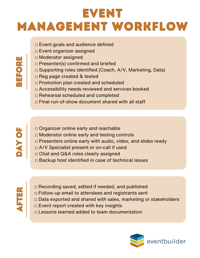
Sample Virtual Event Management Workflow
A quick and easy freebie! Click the image to grab this PDF, and use it as a starting point and adjust based on your event size and format:
When to Bring in External Virtual Event Support
Some events carry higher stakes: executive briefings, large virtual conferences, important partner launches, or public-facing trainings. For these events, you may want extra support.
External partners can help with:
- Additional moderators and technical producers
- Presenter coaching and rehearsal support
- Complex event setups, such as multi-track programs or series
- Reporting and analytics across many events
With an experienced support staff at-the-ready, your team can focus on the tasks that draw attendees, deliver high-impact content, and meet your event goals.
FAQ
How many people do I need to run a virtual event?
It depends on the size and risk level of the event.
- Small internal webinar - 2 to 3 people (organizer, moderator, presenter)
- External customer webinar - 3 to 5 people (organizer, moderator, presenter, plus marketing and data support)
- Large virtual conference: a core team plus supporting roles such as A/V, multiple moderators, and data specialists
Start with the smallest team that can cover planning, hosting, tech support, and follow-up without overloading any single person.
Can one person handle both organizer and moderator roles?
Yes, for small, low-risk events, one person an serve as both organizer and moderator. That person would plan the event, configure it, run the rehearsal, and host the live session.
For public-facing or high-visibility events, it's safer to separate these roles so the organizer can focus on decisions, tech, and stakeholders. This leaves the moderator to focus on attendees, presenters, and timing.
What does a typical virtual event rehearsal look like?
A simple rehearsal can often be done in 45 to 60 minutes and includes:
- A full tech check for presenters and moderator
- Walkthrough of the run-of-show from welcome to closing
- Test of slides, videos, polls, and Q&A
- Practice of intros, handoffs, and closing remarks
- Quick review of backup plans for audio, video, and connectivity issues
End the rehearsal with a short recap email that confirms roles, timing, and any changes.
You Don't Have to Go It Alone
Did you know that EventBuilder offers professional virtual event services and management? Add us to your virtual events team roster and scale up your webinar and virtual event programming. From event development and technical assistance to training and support, you'll pull off your high-stakes virtual events without breaking a sweat. Reach out to talk to one of our pros, and start the conversation today!
Disclaimer: This article was created with some help from AI, but thoroughly edited, revised, reviewed, and fact-checked by a living, breathing, coffee-drinking human writer.
Simulated Live Webinars in Microsoft Teams for Enterprise Events
Microsoft Teams Webinar & Town Hall Reporting: Event Data for ROI
No Comments Yet
Let us know what you think