


If your planning is already done, the next step is your day-of execution guide. Having a production plan for live event delivery is a must-have, not a nice-to-have. Use this guide to help confirm your run of show is solid, clear your technical checks before go-live, keep your team coordinated during the session, and close out cleanly. Each section tells you what to confirm and who should own it.
Let's get you set and ready to run the event without guessing and stressing in-the-moment. Still planning? Start with the Run of Show section and work forward from there.
What is Virtual Event Day-Of Management?
Virtual event day-of management covers the live operational window between your final pre-event check and post-event close-out — including technical readiness, go-live execution, session control, issue response, and wrap.
For the full production framework this sits inside, see: "Virtual Event Production and Management."
Your Run of Show is the Control Center
Your Run of Show is the document your team operates from during the event. It's not the attendee agenda (which is something else entirely). If it's not built yet, build it now. If it is, confirm every item below is in it.
A good run of show tells the team:
- What is happening and when
- Who owns each moment
- What fires next
- What happens when something breaks
What to Include in Your ROS
Event Details
Date, time, platform, producer links, presenter links, emergency contacts for every team member.
Timeline
Every segment, transition, break, with clear start and end cues.
Technical Cues
Slide advances, poll launches, recording start, stream start, stream end.
Role Ownership
Named owners for production lead, platform operator, moderator, speaker liaison, and technical support.
Contingency Triggers
Specific conditions that activate a backup plan, such as what happens if a presenter drops, the stream fails, or the lead goes offline.
Best Practice for Enterprise Teams
Build your ROS at least 48 hours before the event and share it before the technical rehearsal. Every person on the event team needs access the same version; not a copy. It must be the same live document. If someone goes offline mid event, the team keeps moving everything forward.
If you're running the event on Microsoft Teams, include the exact meeting or event link, presenter permissions, and the specific controls the producer will manage live. Those details matter fast when things are moving.
Pre-Show Technical Checks
Treat pre-show technical checks like a release gate, not a box to tick. Assign one technical lead to own each item and clear it before attendees enter.
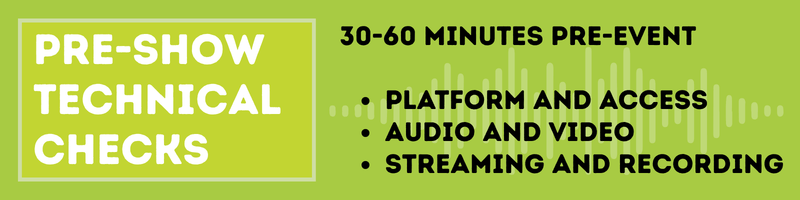
Run these checks 30-60 minutes before go-live. One person owns each item, and nothing opens until everything clears.
Platform and Access
- Production environment open; all producer accounts confirmed active
- Verify presenter and speaker join links
- Check registration sync to platform
- Test the attendee join flow end-to-end; confirmation email, join link, environment entry
- Confirm the production lead can access key controls: mute, recording, admit, end event
Audio and Video
- Test audio for every speaker: no echo, feedback, and clean background
- Video tested for every presenter: framing, lighting, and stable connection
- All presentation materials loaded, displaying correctly, and advancing as expected
- Test screen share for all live presenters
- Confirm pre-recorded videos play correctly and at full quality
Streaming and Recording
- Confirm the stream is going to the correct destination
- Verify recording settings and storage location
- Check audio and video sync in the output
- Confirm backup recording if the event requires it
Pre-Show Decision Rule
Do not open the event with unresolved technical issues. Resolve them first or delay entry until your event environment is ready. For executive, regulated, or customer-facing events, recovery options shrink quickly once the audience is inside.
For everything that happens before the event opens, see: "What Are Virtual Event Logistics."
Live Session Roles and Communication
Once the event starts, the team shifts from preparation to control. That only works with clearly defined roles.
Assign one primary owner and one backup to each role.
Core Production Roles
Production Lead
Owns the run of show, calls cues, manages timing, and decides when to trigger a backup plan.
→ This person should stay focused on control, not audience-facing presentation.
Platform Operator
Manages the live platform actions during the event, including slides, polls, recording, presenter controls, and session settings.
Chat and Q&A Moderator
Monitors attendee questions, flags priority items, and manages moderation. In regulated environments, this role may also need to escalate sensitive questions.
Technical Support Lead
Monitors platform health, attendee access, and stream quality.
→ This person is the first responder when technical issues show up.
Communication Rules
Use one internal channel for live coordination. Keep it clean and simple.
Define:
- Who can call an escalation
- Who makes final decisions
- How the team reports a problem
- When the backup owner takes over
Vague communication rules cost you time at the worst possible moment: during your first live issue. That's a terrible time for surprises, so a thoughtful plan goes a long way.
Contingency Planning
Every enterprise event needs a written contingency plan. Good intentions don't survive live pressure. Before your go-live, confirm your plan covers each scenario below. If you're building it now, the table gives you the minimum viable version for each.
Each scenario needs three things documented:
- The trigger
- The response
- The owner
| Scenario | Trigger | Minimum Response | Owner |
| Presenter drops or loses audio | No contact for 60+ seconds | Host moves to bridge script; operator queues backup asset | Production Lead |
| Platform instability | Confirmed platform failure | Switch to backup channel; send attendee message | Production Lead + Tech Support |
| Production Lead goes offline | Lead unreachable mid-event | Named backup takes the ROS and all controls | Backup Lead (pre-assigned) |
Before You Open the Event, Confirm:
- Each trigger condition is specific and agreed on by the team
- Each owner knows they're an owner: before the event, not during
- The backup lead has live access to the ROS
- Regulated or high-visibility events have an incident log template ready
Event Wrap Checklist
Your event isn't over when the host signs off. The wrap process closes production properly and protects the assets and reporting your team will need afterward.
During the Final 10 Minutes
- Confirm the production lead has called the final cue
- Watch for late-session technical issues or unusual drop-off
- Confirm the survey or feedback follow-up is ready
Immediately After the Session Closes
- Stop the recording
- Confirm the recording saved to the correct location
- Close the attendee-facing environment
- Export attendance and engagement data
- Export Q&A and chat logs if needed
- Confirm on-demand processing has started
Within One Hour of Close
- Send the production debrief
- Record any contingency events and responses
- Confirm follow-up communications are scheduled
- Confirm the production team has completed all handoff tasks
What Teams Miss Most Often
Wrap is where hidden failures tend to show up. A missing recording, incomplete attendee report, or lost chat log is often discovered after the team has already scattered. A documented wrap checklist helps prevent exactly that.
When to Bring in Production Support
If any of this checklist surfaces gaps in your team's live staffing capacity, here's when external support is worth the conversation. While most internal teams can run virtual events successfully with the right processes in place, some need more live coverage than one team can realistically staff while also managing the event outcome.
Bring in professional production support when:
- The event carries reputational or compliance risk
- Multiple sessions or time zones are running at once
- The team manages a high annual event volume
- The platform setup is complex
- The team does not have enough live operators for redundancy
A strong production partner can take ownership of live execution, issue handling, and staffing coverage so your team stays focused on the event itself.
FAQ: Day-of Virtual Event Management
1. What is a virtual event run of show?
A virtual event run of show is the internal document that guides the production team during the event. It includes timing, cues, role ownership, speaker order, technical actions, and contingency triggers.
2. When should technical checks happen?
Use two checkpoints: a full rehearsal 24 to 48 hours before the event, followed by a final pre-show check 30 to 60 minutes before go-live.
The rehearsal gives your team time to fix issues. The day-of check confirms nothing changed overnight.
3. What should a virtual event contingency plan include?
At a minimum, cover presenter failure, platform outage, and production lead failure.
For each, document the trigger, the response, and the owner. Every contingency needs a named person responsible for executing it.
4. How should large teams manage the run of show?
Use a shared live document that everyone can access. The production lead should own the master version, but each role should know exactly what they are responsible for during the session; no one should need to ask.
5. What belongs in a virtual event wrap checklist?
The wrap checklist should include recording confirmation, event closure, attendee and engagement exports, Q&A or chat exports where needed, debrief notes, and follow-up. Treat it as a handoff document between production and whatever comes next.
Run It the Same Way You Plan It
The plan is done. The run of show is built, roles are assigned, and contingencies are documented. At go-live, none of that matters unless the team executes it.
Good events don't happen because everything went right. They happen because the team knew exactly what to do when something went wrong — and something eventually will. The checklists, the roles, the contingency triggers: those give your team the speed and authority to respond without hesitation.
Use this as a working standard, not a one-time reference. Assign owners. Confirm backups. Make sure everyone knows the ROS before the event opens.
If your event volume or complexity has outgrown what your internal team can staff live, EventBuilder's production team works alongside enterprise teams through pre-show setup, live operations, through wrap and beyond. Get in touch and let's start a conversation!

Get the full picture!
Download our Ultimate Virtual Events Checklist today:

Disclaimer: This article was created with some help from AI, but thoroughly edited, revised, reviewed, and fact-checked by a living, breathing, coffee-drinking human writer.
Virtual Event Production Guide for Modern Event Teams

When to Hire a Virtual Event Production Company
No Comments Yet
Let us know what you think