


If you've run hybrid events, you know a basic livestream doesn't cut it with a dual audience. With the competing demands of remote attendee engagement, the high expectations of your in-person audience, and the pressure show measurable success outcomes, pulling off a successful Microsoft Teams hybrid event is no small feat.
A Teams hybrid event works best when it's designed as one shared experience, not simply a room with a camera bolted on as an afterthought. When engagement, production, and support are planned around a single event, (as opposed to two parallel ones), people can participate, be heard, and stay connected from start to finish.
Who this is for: Pros running hybrid events and conferences on Microsoft Teams, especially Internal Comms, HR, IT/AV, and Event Marketing.
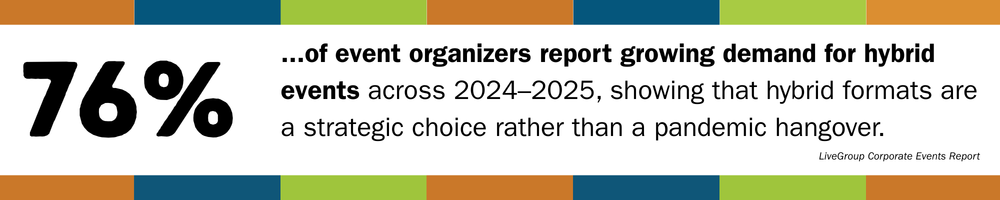
The Quick Answer
Plan your Microsoft Teams hybrid event like a broadcast, not just a meeting with a webcam. That means prioritizing audio, camera coverage, and clear visuals, giving both audiences intentional ways to participate, and assigning clear roles so the room and the stream are supported equally.
Key Takeaways
- Plan for interaction first - Decide how Q&A, chat, polls, and discussion will work for both audiences, not just whoever's in the physical room, as early in the process as possible.
- Build trust with production quality - Hybrid events designed with a focus on strong audio, thoughtful camera framing, good lighting, and readable, accessible visuals matter more than fancy transitions ever will. Lean on Microsoft's equipment recommendations to ensure everything plays nice with Teams.
- Assign clear roles - This is a biggie. At a minimum you need a host, an experienced Teams moderator, event support, and an on-site AV tech. Presenters should not have to troubleshoot live.
- Choose the right Teams format - Meetings, Webinars, and Town Halls each behave differently. Pick based on scale, security, and how much interaction you want.
- Rehearse with a run-of-show - A written run-of-show and a full technical rehearsal will save you 90% of avoidable stress. We really can't emphasize this enough!
How Microsoft Teams Hybrid Events Differ From Standard Meetings
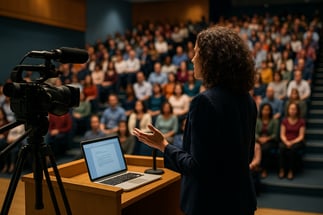
A hybrid event in Microsoft Teams isn't "a meeting, only bigger." You're actually running one event with two very different experiences:
- In-person attendees feel the energy in the room, the body language of the presenters and other participants, and can jump into engagement easily.
- Remote attendees can only experience what your cameras, microphones, and moderators allow them to see and hear.
Without an intentional design accommodating both perspectives, one group will feel like the "real" audience, and the other will quietly disengage. (Hint: that's bad!)
Common Challenges When Running Hybrid Events on Teams
Hybrid events fail in predictable ways. None of these are rare, and, fortunately, all of them are fixable.
Audio and Video Quality
If your remote attendees can't hear clearly, they'll check out quick. Audio problems are noticed before anything else, every single time. Invest in microphones and sound checks before worrying about any of your visuals.
Engagement Imbalance
When interaction flows only through the room, virtual attendees fade into the background. Without clear plans for chat, Q&A, polls, or reactions, they default to passive viewing, negatively affecting your attendee's overall satisfaction with your event.
Networking Gaps
Spur-of-the-moment hallway conversations don't magically translate to Teams; you need intentional touchpoints. Implement moderated chat prompts, structured breakout sessions, and/or dedicated networking moments.
Technical Complexity
Cameras, microphones, presentation laptops, AV gear, and Teams all have to be compatible and play nice with each other. Without clear ownership and a cohesive tech plan, things get stressful quickly.
Content Built For One Audience
Slides that look fine in the room can be unreadable online for everyone, particularly virtual attendees with accessibility needs. Font size, contrast, pacing, and how content is shared matter more when two audiences are watching differently.
Split Moderation
When questions are coming from everywhere: room mics, chat, Q&A - chaos can ensue. A dedicated moderator keeps things balanced and makes sure remote voices are heard.
When these pieces aren't well-planned, organizers feel stretched thin, and both audiences feel it.
Why Microsoft Teams Works Well For Hybrid Events
If your organization already lives in Microsoft 365, Teams is a natural hub for hybrid events.
Flexible Event Formats
- Teams Meetings for smaller, interactive sessions
- Teams Webinars when you need registration and more control
- Teams Town Halls for large-scale broadcasts and executive updates
Built-In Engagement Tools
A Teams-experienced moderator assigned to deploy chat, reactions, Q&A, and live polls give remote attendees multiple ways to participate successfully.
Accessibility and Inclusion
Live captions, on-screen ASL interpreters, transcripts, and recordings support accessibility, as well as opening up events to be good on-demand assets.
Security and Compliance
Events run within your existing Microsoft environment, aligning with your organization's governance and access controls.
Planning Engagement that Includes Both Audiences
Good hybrid management doesn't happen automatically. It's designed.
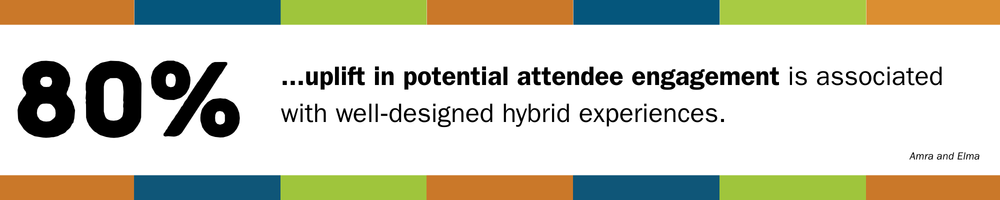
Start With Shared Goals
Before choosing tools, answer a few practical questions:
- What should people know, feel, or do by the end?
- Where does live interaction actually matter?
- Which moments are most important for remote attendees?
- When should the room lead, and when should online voices come first?
Use these answers to shape your run-of-show.
Next, Build a Simple Run-of-Show
A one--page run-of-show should include:
- Segment timing and flow
- Who's speaking (and from where)
- Engagement moments (polls, Q&A, chat prompts)
- Who launches and moderates each interaction
- Notes for AV and IT
Give People Clear Ways to Participate
Some things our event specialists have found that work well in Teams hybrid events:
- Opening polls everyone can answer
- Q&A collected throughout, surfaced at set moments
- Reaction prompts so remote attendees can respond in real time
- Short breakout discussions for both audiences
For longer sessions, a shared engagement moment when it lines up with what the speaker is saying is a good guideline for combined participation opportunities.
Production Roles and Room Setup Basics
Hybrid events run smoother when the roles are clear and expectations are realistic.
Core Roles to Plan For
- Host or Emcee to guide the experience and set expectations
- Teams Moderator to manage the chat, Q&A, and online engagement
- On-site AV or Event Support to handle cameras, audio, and visuals
For larger events, consider additional roles you may need, such as a producer, director, or presenter support.
Room Setup Essentials
You don't need a TV studio, but you DO need:
- A camera that shows the presenter and gives a sense of the room
- Separate microphones for presenters and audience questions
- A clear front-of-room display for Teams content
- A reliable network connection someone is actively monitoring
When to Bring in Hybrid Event Production Support
While some events are manageable internally, others carry more risk than you and your team have the bandwidth and/or expertise for. Between the technical management, complex registration that's required, and staffing, you may find that your event needs some practical support.
Consider outsourcing support when:
- The event is high-profile, e.g., executives or major announcements are involved.
- The audience is large and/or global
- Multiple presenters, particularly if some are remote, are participating
- The venue's AV support is limited
- You're running a recurring Town Hall or series that needs consistency
How EventBuilder Supports Microsoft Teams Hybrid Events
We help organizations turn Teams events into one cohesive experience, not two disconnected ones. Our support typically includes:
- Ensuring the AV and other tech works cleanly with Teams
- Registration setup and implementation for both audiences
- Teams setup for Meetings, Webinars or Town Halls
- Dedicated and experienced virtual moderation
- Bridging engagement between room and remote audiences
- Real-time technical monitoring
- A shared run-of-show so everyone knows what's happening and when
If your goal is fewer surprises, calmer presenters, uninterrupted tech delivery, and a better experience for everyone attending, EventBuilder can help. Get started with us today!
Practical Strategies: Delivered
Want expert-informed strategies for producing large and hybrid events on Teams? Download our free whitepaper: The Ultimate Toolkit for Large-Scale Virtual and Hybrid Events on Microsoft Teams!
You'll get guidance on technical setup, audience engagement, and production practices that apply to both fully virtual and hybrid scenarios.
Get it today!
Disclaimer: This article was created with some help from AI, but thoroughly edited, revised, reviewed, and fact-checked by a living, breathing, coffee-drinking human writer.
Microsoft Teams Webinar & Town Hall Reporting: Event Data for ROI
Simulated Live Webinars in Microsoft Teams for Enterprise Events
No Comments Yet
Let us know what you think