

.png?width=150&height=150&name=EB%20Academy%20Logo%20White%20Circle%20(1).png)
What is Virtual Event Production and Management?
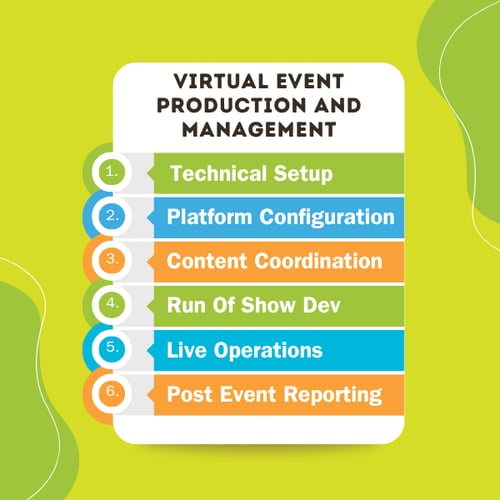
Virtual event production and management is the work required to plan, build, run, and wrap up a virtual event. It encompasses technical setup, platform configuration, content coordination, run-of-show development, live operations, and post-event reporting.
Key Takeaways
- Virtual event production has three phases: pre-production, live execution, and post-event. Each phase has its own tasks, owners, and risks.
- Most event failures trace back to pre-production gaps, not day-of-technical problems.
- Your production team and your presentation team are not the same thing, but people can take on overlapping roles. Core production roles: Producer, Attendee Support, Program Manager. Moderators are an essential piece of the attendee-facing event delivery, bridging the production and presentation teams.
- Live streaming needs its own planning track; don't wait to sort out the logistics in the week before your event.
- Post-event production has real deliverables. Treat it like a phase, not cleanup.
- If your events are large, high-visibility, or regulated, your internal production capacity may not match the risk you're carrying.
Get your free copy of The Wow Factor: Level Up Your Virtual Event Production. Inside, you'll get the information you need about the essentials for great virtual event productions, equipment recommendations for Standard, Prosumer, and Professional event levels, and the specs you need for audio, video, lighting, and more.

Smaller events can sometimes combine roles, but complex events need dedicated people in each position.
Technical Producer
Controls the platform, manages the transitions between speakers, slides, and pre-recorded content, cues presenters throughout the run-of-show, and handles technical issues in real time without the audience seeing any of it. The producer should have host-level platform permissions during the live session. When other team members hold those permissions, you run the risk of accidental setting changes mid-event. The role requires live event experience in addition to platform knowledge. Knowing the platform is the starting point. Staying composed during unexpected glitches is another skill entirely.
Moderator
Manages the attendee experience during the live event: welcoming attendees, setting session expectations, managing the Q&A queue, launching polls, and monitoring chat. The moderator may screen audience questions before they reach your presenters, as well. A dedicated moderator keeps the Q&A managed and transitions feeling smooth, so your presenter can focus on delivering content instead of managing the room.
Attendee Support
Handles individual technical issues that come up on the attendee side during a live event: access problems, audio and video troubleshooting, browser compatibility, and platform navigation. Without a dedicated support contact, those issues land in the chat feed or go unresolved, which can be visible to everyone in the session. For enterprise events with global audiences, 24/5 support coverage matters. Attendees in different time zones should not have to troubleshoot platform access on their own.
Laura Lim, Specialized Events Program Manager:
"Handling attendee support and moderating content-related questions is often too much for a solo moderator. We've found that it's better to let the moderator focus on delivering content support and let someone familiar with the technical aspects of the meeting platform handle the rest."

Content Coordinator / Program Manager
Owns the coordination layer in the weeks before the event: collecting and reviewing presenter content maintaining the run-of-show, scheduling rehearsals, and keeping speakers and stakeholders aligned. Without this role, that work defaults to the producer, which means the person responsible for technical execution is also chasing slide decks and managing scheduling conflicts. While taking on a dual role like this can be done, for more complex programs that's more of a risk.
For a detailed breakdown of these roles across different program types, see: Virtual Event Management Roles and Responsibilities
Your technology stack directly affects the quality and reliability of your virtual event. For enterprise events in particular, platform reliability, security, and integration capability matter as much as features.
Your Platform
Your platform needs to handle your expected audience size, support your registration and data requirements, and meet your security and compliance standards. If your organization runs Microsoft 365 and you're running larger, external-facing, or events with more complex registration, security, and compliance requirements, Microsoft Teams will likely need more robust tools that can be layered on rather than running a separate platform. Organizations accomplish this by adding tools on top of Teams rather than switching platforms entirely, since the underlying governance and security model stays intact.
For help choosing the right Teams event format, see Mastering Large Virtual and Hybrid Events on Microsoft Teams.
Audio and Video
Audio quality shapes how attendees perceive your event more than any other factor. Bad audio loses your audience faster than any other production problem. At minimum, your presenters need a dedicated USB or XLR microphone, a wired internet connection where possible, adequate lighting, and a tested camera for high-visibility events.
The Level Up Your Virtual Event Production whitepaper covers equipment specs across Standard, Prosumer, and Professional production levels if you want a detailed equipment guide for your team.
Backup Plans
Your production plan needs a clear answer to: what happens if X fails? At minimum, you need a backup connection path for presenters, a fallback for critical slides or pre-recorded content, a documented procedure for platform outages, and direct IT contacts with individual names and numbers. A general helpdesk queue is not a reliable contingency plan. For regulated industries, it's smart to document what happens to the recording, such as how to salvage it if a session is interrupted, how attendee follow-up will be handled, and how data is managed if the event ends early.
Documenting your plan is a key to successfully recovering from an unexpected problem and keeping the audience's experience intact.
Produce Large-Scale Microsoft Teams Events With Confidence
Download our free guide, "The Ultimate Toolkit for Large-Scale Virtual and Hybrid Events on Teams," to get all the details you need to deliver the large-scale Teams and Town Hall events that succeed.

Live streaming requires its own planning track. The signal path from camera and microphone through your encoder to your event platform has more failure points than a standard virtual event setup, and most of them are preventable with the right preparation.
Encoding and Output
Your encoder packages video and audio into a format your platform can receive via RTMP or SRT and sends it to the platform's ingest server. Software encoders like OBS or vMix offer flexibility and scene control but are resource-intensive. Dedicate one machine exclusively to encoding during the event. Hardware encoders offer fewer features but greater stability, making them a better fit for high-stakes broadcasts where reliability matters more than complex graphics.
Whichever you choose, confirm that your resolution, frame rate, bitrate, keyframe interval, and audio sample rate match your platform's ingest requirements before rehearsal.
Bandwidth
As a general rule of thumb, your upload bandwidth should exceed your encoder's target bitrate, Roughly 2x is the working guideline. Test your actual upload speed in the room where you'll stream, at the same time of day as your event. Advertised speeds and real-world performance are rarely the same number.
Latency
Live streams carry a delay between when a presenter speaks and the audience receives it. For formats with live Q&A and polling, that gap directly affects the attendee experience. Build latency awareness into your run-of-show and test it during rehearsal from a separate device on a different network, giving you actual insight into what your audience will experience.
CDN Delivery
High-attendance events and global enterprise programs need a CDN for consistent playback quality across geographies. For regulated industries, stream reliability may also be a compliance requirement. If you have attendees from regions with data residency requirements, confirm your CDN configuration meets those requirements before they go live.
What's a CDN?
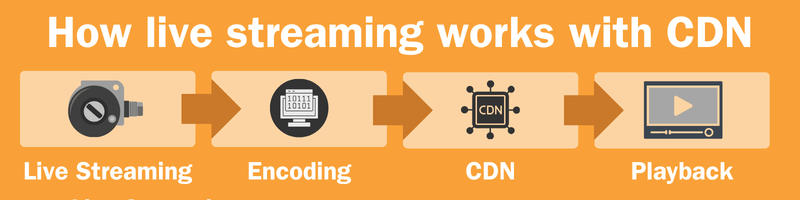
A CDN, or Content Delivery Network, is a geographically distributed group of servers that cache web content near users. The system reduces buffering, speeds up load times, and protects website from traffic spikes.
For a complete streaming workflow, see Live Streaming a Virtual Event: Setup and Workflow
Single-session webinars are manageable with a small team and a solid run-of-show. Conferences, summits, and multi-day programs need a different production approach entirely: more roles, more coordination touchpoints, and more places for things to go wrong between sessions rather than during them.

Transitions
Every transition between sessions is a moment where you lose attendees. Plan transitions as deliberately as you plan the sessions themselves: who is on screen, what plays between sessions, and how attendees move from one session to the next. A dead 90 seconds with no visual, no host, and no clear instruction is enough to send a meaningful percentage of your audience elsewhere. Produce for the gaps, too.
Breakout Rooms
For larger conferences, your staffing plan should treat breakout moderation as its own workstream with dedicated coverage, not an afterthought assigned to whoever is available. For more on how moderation scales across complex event formats, see How to Staff Your Virtual Event Production Team.
Pro Tip: Assign moderators to each room or a small cluster of rooms.
Unmoderated breakouts run long, go off-topic, and hit technical problems with no one in a position to fix them.
Speaker Coordination
Multiple speakers across sessions means content review, rehearsal scheduling, and day of briefing become their own project. Assign a content coordinator to manage speaker communications, collect and review materials, and run pre-event briefings independently. Without a dedicated owner, something gets missed and on a multi-session event, a missed briefing shows up on camera in front of your full audience.
Attendee Flow
Configure your platform to move attendees between sessions cleanly, and test that flow during rehearsal. Your platform data should capture session-level attendance and movement accurately, because post-event reporting on a multi-session event depends on knowing which sessions your attendees came to, for how long, and where they dropped off. That data shapes how your team evaluates the program and how you report results to leadership.
Your team has limits. That's a resource reality. Consider bringing in outside production support when:
- Your events regularly run above 300 attendees or in front of executive, external, or regulated audiences.
- Your team is covering production alongside communications and other program responsibilities at the same time.
- You've had production incidents and do not have the capacity to build against those risks internally.
- Your events involve compliance or security requirements that go beyond what most event teams own.
- You run a program of recurring events and need consistent quality across every execution.
EventBuilder provides full virtual event production and management for enterprise organizations, including dedicated producers, platform specialists, and post-event reporting, built within the Microsoft 365 environment. For compliance-driven industries specifically, EventBuilder holds ISO 27001 and ISO 27701 certifications for information security and privacy management, and is WBENC-certified as a 100% women-owned business. Your team keeps strategic ownership while experienced producers handle execution.
For guidance on evaluating outside production partners, see Hiring a Virtual Event Production Company.